OLED is the better monitor for picture quality and motion: every pixel makes its own light, so blacks are truly black, contrast is effectively unlimited and pixels respond in a fraction of a millisecond. IPS is the better monitor for bright rooms, sharp text and long hours of static work: it gets brighter across the whole screen, costs less and can’t suffer burn-in. If you mostly game or watch HDR content in a dim room, get OLED. If you mostly work in spreadsheets, code or documents, or your desk faces a window, get IPS.
That’s the short answer. The longer one depends on how you actually use your screen, so this guide compares the two panel types on the things you’ll notice day to day: contrast, brightness, motion, text clarity, burn-in, color and price. Where we quote numbers, they come from independent lab averages rather than the figures printed on the box, because the two can be very different. We also cover where VA panels fit, since “IPS vs VA” is the other decision many monitor shoppers get stuck on.
IPS vs OLED at a glance
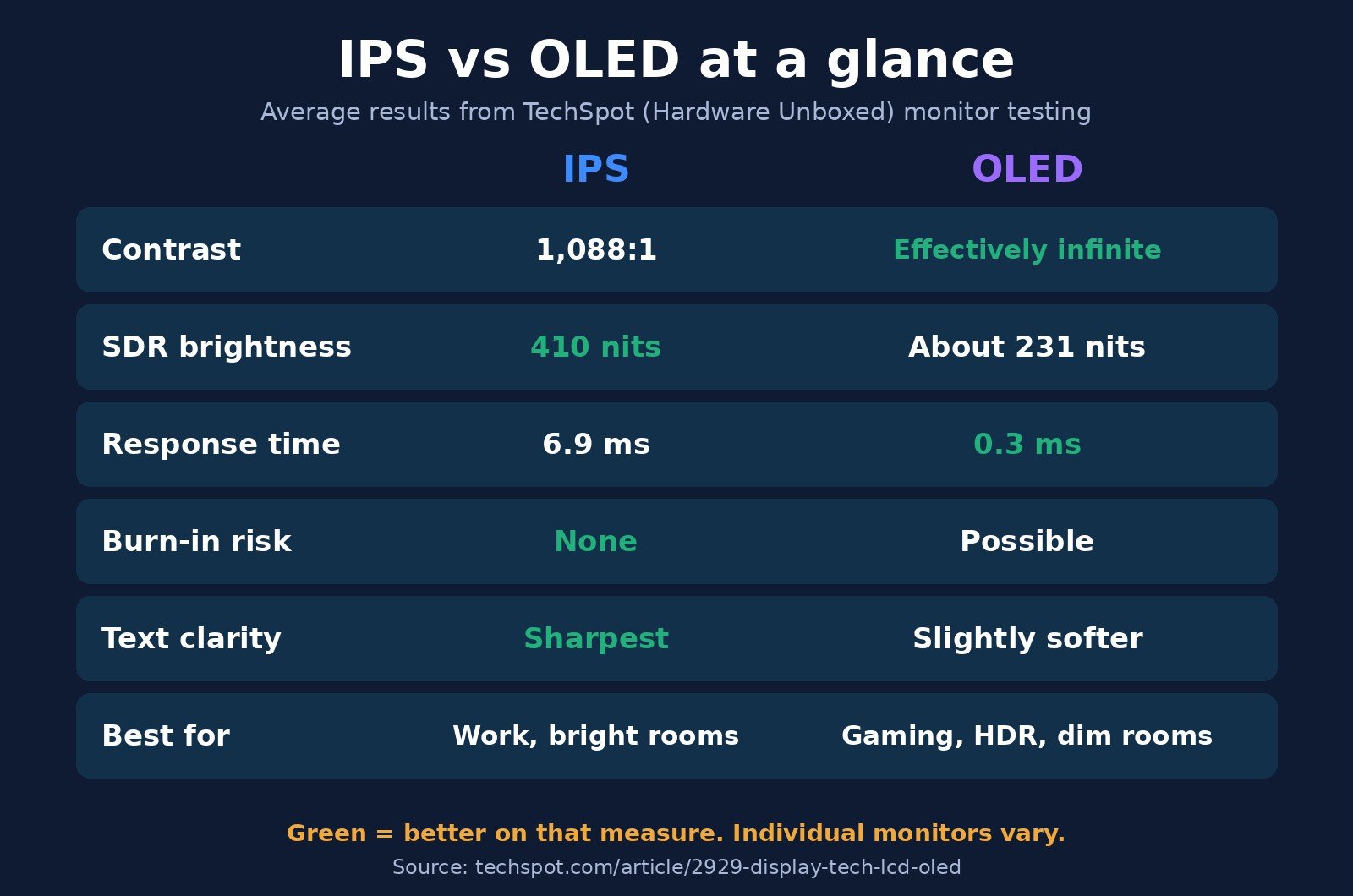
The averages below come from TechSpot’s (Hardware Unboxed) cross-technology comparison, which pooled measurements from the monitors it has tested. Individual models can be better or worse than the average.
| Feature | IPS (LCD) | OLED (QD-OLED and WOLED) |
|---|---|---|
| How it makes light | Backlight behind a liquid crystal layer | Each pixel emits its own light |
| Average native contrast | 1,088:1 | Effectively infinite (pixels switch fully off) |
| Average full-screen SDR brightness | 410 nits | About 231 nits (QD-OLED ~246, newer WOLED ~260) |
| Average response time | 6.9 ms (newer panels 4 to 6.5 ms) | 0.3 ms |
| Text clarity | Best (standard RGB stripe) | Slightly softer at the same resolution |
| Burn-in risk | None | Yes, from long-term static content |
| Best for | Office work, coding, bright rooms, budgets | Gaming, HDR movies, dim rooms |
How IPS and OLED panels work
IPS (in-plane switching) is a type of LCD. A backlight shines white light through a layer of liquid crystals, which twist to let more or less light through, and color filters turn that light into red, green and blue subpixels. In an IPS panel the crystals sit parallel to the screen and rotate in that plane, which is why IPS has wide, consistent viewing angles. The catch is that the backlight is always on behind the image, so the crystals have to block light to make black, and they can’t block all of it.
OLED (organic light-emitting diode) has no backlight. Each subpixel is a tiny light source that can be dimmed or switched completely off on its own. There are two main kinds in monitors, as TechSpot explains: QD-OLED (from Samsung Display) generates blue light and converts some of it to red and green with a quantum dot layer, while WOLED (from LG Display) generates white light, filters it into colors and adds a fourth white subpixel. Both behave similarly for most buyers, with differences in brightness, color and text rendering covered below.
If you’re also shopping for a TV, the same OLED technology competes against quantum-dot LCDs there; see our OLED vs QLED comparison for the living-room version of this decision.
Contrast and black levels: OLED wins clearly
Contrast is the gap between the brightest white and the darkest black a screen can show at the same time. It’s the single biggest visible difference between these two technologies.
In TechSpot’s testing, IPS monitors averaged a native contrast ratio of 1,088:1, with about 29% of tested models falling below 1,000:1. With the screen calibrated to 200 nits, the average IPS black level was 0.19 nits. That’s low, but it isn’t zero, and in a dark room black backgrounds look dark gray. IPS panels also show “IPS glow,” a whitish haze in the corners of dark scenes when viewed at an angle, which TechSpot notes varies between individual units.
OLED pixels showing black are simply off, so the black level is zero and contrast is effectively infinite. The VESA standard for OLED-class HDR monitors, DisplayHDR True Black, requires a maximum black level of 0.0005 cd/m² in its tests. In practice that means starfields, dark game levels and letterboxed movies look noticeably deeper on OLED.
Some IPS monitors close part of the gap with a mini LED backlight that dims hundreds or thousands of zones behind the panel. That helps a lot in HDR, but zones are much bigger than pixels, so small bright objects on black backgrounds can show halos (“blooming”). DisplayNinja points out that a 4K OLED effectively has one dimming zone per pixel, which is why it doesn’t bloom.
Brightness: IPS wins for bright rooms and white screens
Here the result flips. Across more than 150 LCDs it tested, TechSpot measured an average peak SDR brightness of 402 nits, against just 231 nits for OLEDs, which makes LCDs about 74% brighter on average. IPS models alone averaged 410 nits. QD-OLED models clustered around 246 nits and newer WOLED models around 260 nits.
The reason is heat and wear. OLED monitors use automatic brightness limiting (ABL): when a large part of the screen is bright, the monitor lowers brightness to protect the organic material. A small HDR highlight can be very bright, but a full-screen white document or web page is much dimmer. XDA’s comparison makes the practical point: if you work during the day with sunlight in the room, an IPS monitor is easier to live with.
Marketing numbers can mislead here. A spec sheet such as Dell’s for the Alienware AW3225QF lists 1,000 cd/m² as the typical HDR peak, which applies to a small patch of the screen, not a full white page. Look for full-screen or “100% window” brightness in independent reviews if you care about daytime use.
Motion and response time: OLED wins for gaming
Response time is how quickly a pixel changes from one shade to another. Slow transitions show up as blur and ghost trails behind moving objects.
In TechSpot’s measurements, OLED monitors averaged 0.3 ms, whether QD-OLED or WOLED, and that speed holds steady at every refresh rate. Across more than 80 IPS monitors, the average gray-to-gray response time was 6.9 ms, with newer panels landing between 4 and 6.5 ms. TechSpot’s rule of thumb is that an OLED at a given refresh rate looks about as clear in motion as an LCD running at 1.5 times that rate, so a 240Hz OLED is closer to a 360Hz LCD than to a 240Hz one.
That doesn’t make IPS bad for gaming. A good modern IPS panel keeps up with high refresh rates well, and TechSpot found no difference in processing input lag between panel technologies. But if you play fast shooters or racing games and want the clearest motion, OLED has a real advantage. Note that the “0.03 ms” figures on OLED boxes are a manufacturer minimum, not an average; independent measurements are the better guide.
Whatever you buy, a high refresh rate only helps if your PC can deliver the frames and the cable can carry them. Check what GPU you have, keep your graphics drivers updated, and read our HDMI vs DisplayPort guide before choosing a port.
Text clarity: IPS is better for work
IPS panels use a standard red-green-blue stripe for each pixel, which is the layout Windows’ text rendering expects. OLED panels use different arrangements: QD-OLED uses a triangular layout and WOLED adds a white subpixel. According to TechSpot, those layouts can make text slightly less clear at the same resolution, sometimes with faint color fringes along the edges of letters.
How much you notice depends on pixel density and on you. Higher-resolution OLEDs (for example a 27-inch 4K screen) show far less fringing than a 27-inch 1440p model. If you’re unsure how resolution and screen size affect sharpness, our explainer on DPI vs PPI covers pixel density. For people who read and write all day, IPS still gives the crispest text per dollar.
Burn-in: how real is it on OLED monitors?
Burn-in is permanent ghosting of something that stayed on screen for a long time, such as a taskbar, a game HUD or a channel logo. Tom’s Hardware explains the cause: OLED pixels slowly lose brightness the more they’re driven, and when heavily used pixels sit next to lightly used ones, the difference shows up as a faint image. It’s different from temporary image retention, which fades after a few minutes.
IPS panels don’t burn in this way. Their liquid crystals and backlight age too, but evenly, and TechSpot calls LCDs “a far better choice for static content,” which is most of what a desktop monitor shows.
Modern OLED monitors fight burn-in with pixel shifting, logo dimming and automatic pixel refresh cycles. Tom’s Hardware notes that pixel refresh typically runs after roughly 4 hours of screen-on time and takes about 4 minutes. Some manufacturers now put burn-in in writing:
- Dell’s Alienware support page says QD-OLED panels have a 3-year maximum warranty term that includes burn-in.
- ASUS’s OLED warranty FAQ says its ROG Swift PG32UCDM and newer OLED models carry 3 years including panel burn-in, while several earlier OLED models are covered for 24 months.
Coverage varies by model and country, so check the exact product page before you buy. The honest summary: for mixed gaming and media use with sensible habits, burn-in is unlikely to be a problem within a typical warranty period. For eight-plus hours a day of the same static windows at high brightness, it remains a real risk, and that’s the use case where IPS is the safer pick.
Color and viewing angles
Both technologies look excellent here. TechSpot measured QD-OLED monitors at an average of 81% Rec. 2020 color coverage and WOLED at 72%, while the best wide-gamut LCDs have reached about 87%. In plain terms, QD-OLED tends to show the most saturated colors of the OLED options, and a good wide-gamut IPS can match or beat it.
IPS is known for wide viewing angles, and OLED is slightly better still. QD-OLED’s design gives it a small edge over WOLED, but both hold color well off-axis. One practical note: Display Verdict points out that QD-OLED screens can show “gray lift” in bright rooms, where ambient light makes blacks look grayish, and glossy finishes add reflections. That’s another reason OLED looks its best in a controlled, dimmer room.
Price and value
OLED monitors sit at the premium end of the market. TechSpot describes OLED as a compelling alternative “for buyers looking at premium-priced monitors,” while IPS covers everything from basic office screens to high-end mini LED models. Prices move constantly, especially around sales, so compare current listings for the size and resolution you want rather than relying on old price guides. As a general pattern, the same budget buys a larger, higher-resolution or higher-refresh IPS than OLED.
IPS vs VA: where VA panels fit
VA (vertical alignment) is the other main LCD type, and it’s the middle ground between IPS and OLED for contrast. In TechSpot’s data, VA monitors averaged 3,238:1 contrast, roughly three times a typical IPS, with an average black level of 0.067 nits at 200 nits brightness. Average brightness is similar to IPS (394 nits for VA vs 410 for IPS).
The trade-off is speed and consistency. Non-Samsung VA panels averaged 10.8 ms response times and can show “dark level smearing,” a dark trail behind moving objects. Well-tuned Samsung VA panels are much faster, at 3 to 4 ms. VA viewing angles are also narrower than IPS. Choose VA if you want deeper blacks than IPS on a budget, mostly watch movies or play slower games, and sit straight in front of the screen. Choose IPS if you want the most consistent all-rounder for color, angles and motion.
Which should you buy?
| If you… | Choose | Why |
|---|---|---|
| Work in documents, spreadsheets or code all day | IPS | Sharper text, no burn-in worry from static windows |
| Sit in a bright room or near a window | IPS (or mini LED IPS) | Higher full-screen brightness, no ABL dimming |
| Play fast competitive games | OLED | About 0.3 ms average response, clearer motion at the same refresh rate |
| Watch HDR movies or play dark games in a dim room | OLED | True blacks and no blooming |
| Need color-accurate work and long hours | IPS, or OLED with burn-in warranty | Both have wide gamut; IPS is safer for static tools |
| Are on a tight budget | IPS (or VA for contrast) | More size, resolution and refresh rate for the money |
| Use one screen for both gaming and work | Either, with care | OLED if you can auto-hide toolbars and vary content; IPS for zero maintenance |
A common setup is both: an OLED as the main gaming screen and an IPS beside it for chat, docs and other static windows. If you go that route, our guide to splitting the screen on Windows 11 helps you arrange windows, and our USB-C vs Thunderbolt explainer covers single-cable laptop docking.
If you buy OLED: simple habits that reduce burn-in
These come from Tom’s Hardware’s OLED care tips and the monitor makers’ own protection features:
- Set the screen to turn off or show a screensaver after 5 to 10 minutes of inactivity.
- Auto-hide the Windows taskbar instead of keeping it docked.
- Use dark mode where you can, and avoid running at maximum brightness for long periods.
- Use a slideshow or dynamic wallpaper instead of a fixed desktop image.
- Turn on game options that hide or fade static HUD elements.
- Leave the monitor’s own protections on (pixel shift, logo dimming) and let pixel refresh cycles finish rather than unplugging the monitor.
IPS vs OLED: frequently asked questions
Is OLED better than IPS?
OLED is better for contrast, black levels and motion clarity, which makes it the stronger choice for gaming and HDR in a dim room. IPS is better for full-screen brightness, text clarity and static desktop work, has no burn-in risk and usually costs less. Neither is better for everyone.
Is OLED or IPS better for gaming?
OLED is better for most gaming. Independent tests by TechSpot measured an average OLED response time of 0.3 ms against 6.9 ms for IPS, so a 240Hz OLED looks about as clear in motion as a 360Hz LCD. A fast IPS is still a good, cheaper gaming monitor, especially in a bright room.
Is IPS or OLED better for office work and coding?
IPS is usually better for office work and coding. Its standard RGB subpixel layout gives the sharpest text, it holds higher brightness on white pages, and long hours of static windows can’t cause burn-in.
Do OLED monitors still get burn-in?
Yes, burn-in is still possible on OLED monitors, though pixel shifting, logo dimming and pixel refresh make it much less likely with varied use. Some makers, including Dell for its QD-OLED Alienware models and ASUS for newer ROG OLED models, include burn-in in a 3-year warranty. IPS monitors don’t get burn-in.
Why does my OLED monitor look dimmer than my IPS?
OLED monitors use automatic brightness limiting, which lowers brightness when much of the screen is bright, such as a white web page. TechSpot measured average SDR brightness of about 231 nits for OLED monitors versus 402 nits for LCDs, so OLEDs look dimmer in bright, full-screen content even when their HDR peak brightness is high.
Is IPS or VA better?
IPS is the better all-rounder thanks to wider viewing angles and more consistent response times. VA has about three times the contrast of a typical IPS (3,238:1 vs 1,088:1 on average in TechSpot’s testing), so it shows deeper blacks for movies, but most VA panels are slower and can smear dark scenes.
The bottom line
Choose OLED if picture quality and motion matter most and you mainly game or watch content in a room you can keep fairly dim; get a model with a burn-in warranty and use the simple care habits above. Choose IPS if you spend long days on static work, need a bright screen in a sunny room, want the crispest text or want the most monitor for your money. If you want deeper blacks than IPS without OLED pricing, a VA panel is the in-between option. Pairing a new monitor with a new PC? Our Intel vs AMD guide covers the other half of the setup.

The Teck Hustlers Editorial Team covers technology, business, finance and gaming news for readers who want the story behind the headline. Every article is researched, written and edited by our in-house team, checked against company announcements, filings and reputable reporting, and updated when new facts emerge. We focus on what each development means for founders, professionals, investors and everyday users. Have a tip or a correction? Reach us through our contact page.