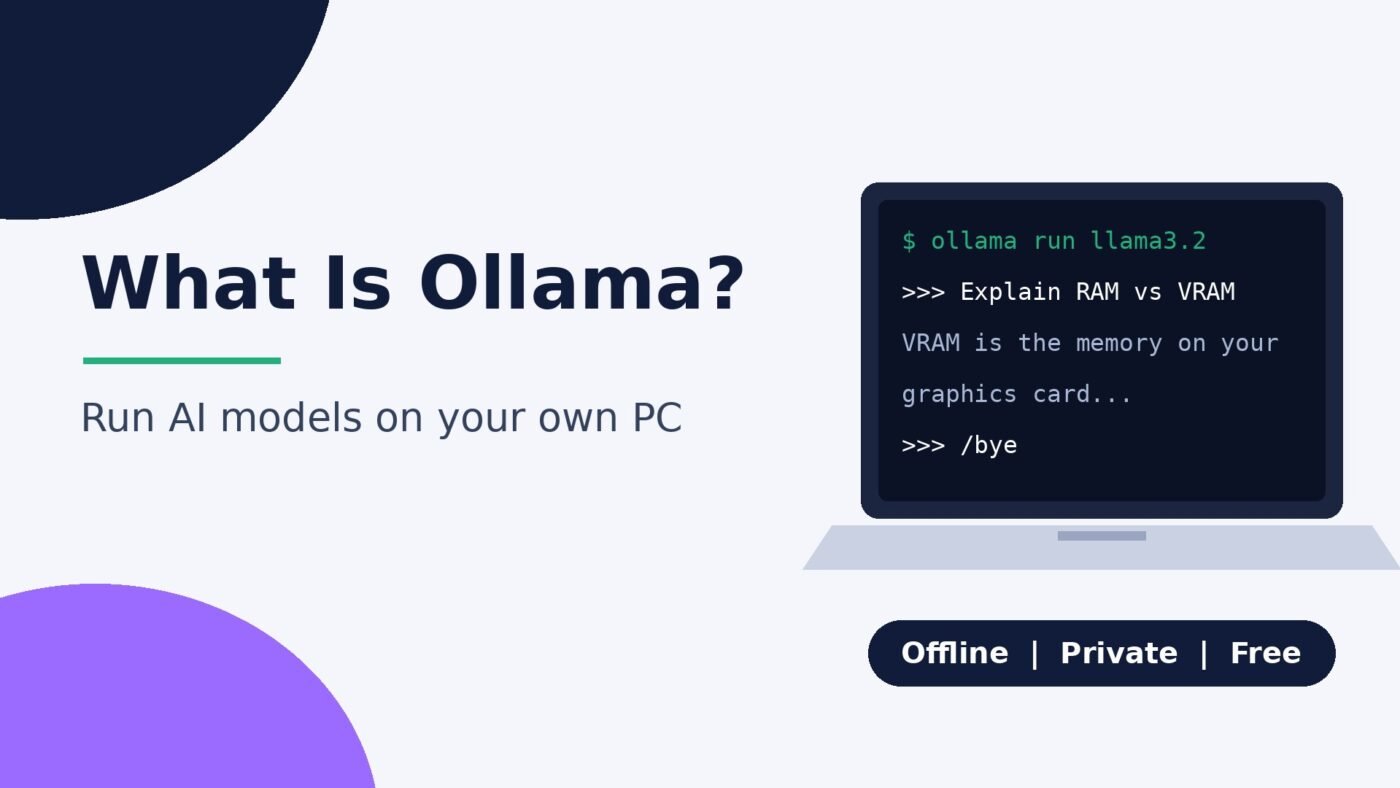
Ollama is a free, open-source app that downloads and runs AI language models on your own computer. You install it on Windows, macOS or Linux, pick a model from its library (such as Gemma, Llama, Qwen or gpt-oss) and chat with it in the app, in a terminal or through a local API that other programs can use. When you run a model locally, your prompts stay on your machine and work offline once the model is downloaded. Ollama also offers optional cloud models for bigger jobs, but you don’t need an account to run models locally.
That’s the short answer. The longer one covers what Ollama actually does, what hardware you need, how to get your first model running and where it fits next to tools like LM Studio or ChatGPT. Specific requirements and prices below link to Ollama’s own documentation and pricing page, which change often, so check them before you buy hardware or a plan.
What Ollama does, in plain English
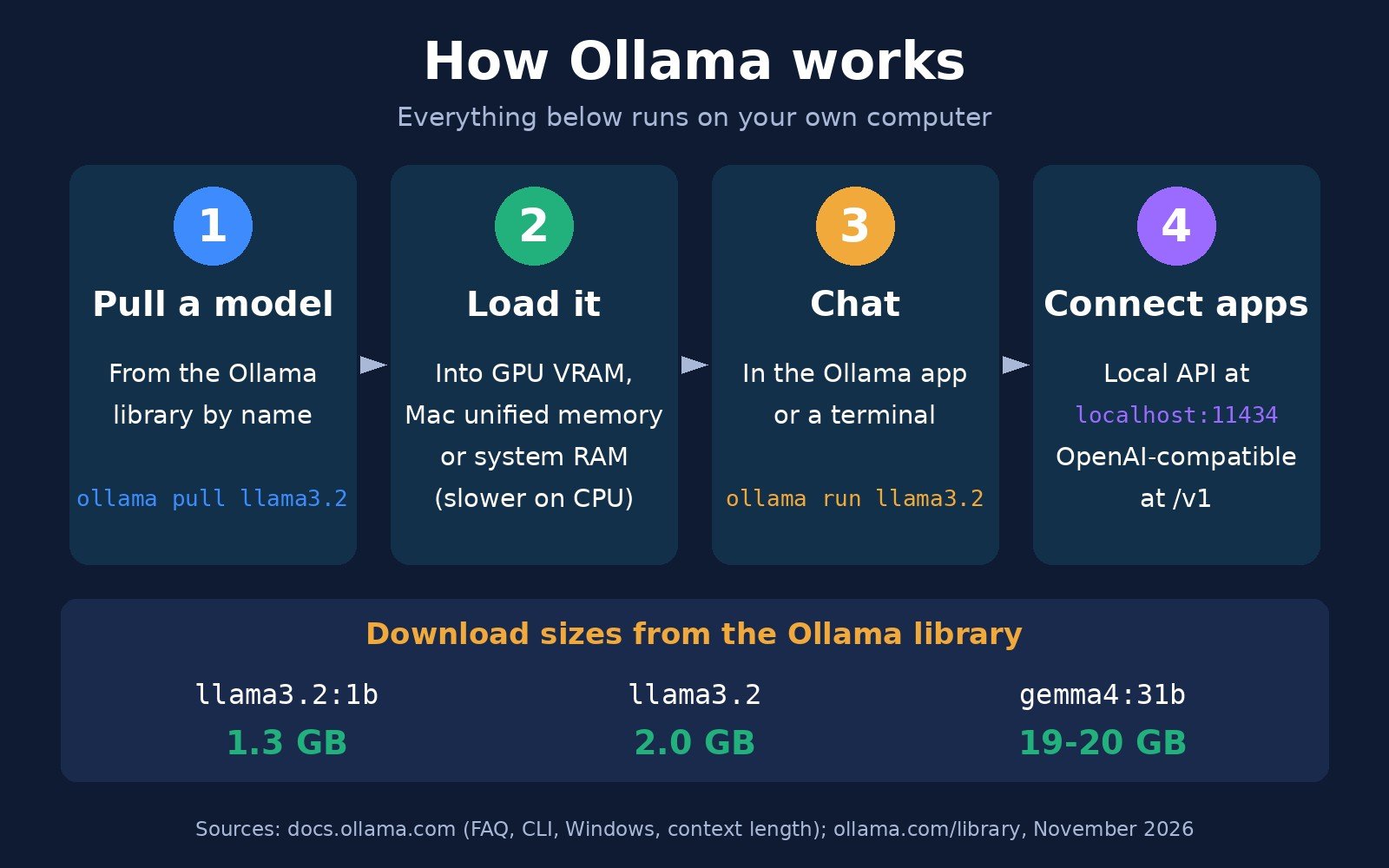
Running an AI model yourself used to mean hunting down model files, installing Python libraries and tuning GPU settings by hand. Ollama bundles all of that into one program. A useful way to picture it is “an app store plus an engine” for open AI models. It has four parts:
- A model library. ollama.com/library lists ready-to-run models by name. You type a name and Ollama downloads the right files; you don’t have to deal with file formats.
- A runtime. Ollama loads the model into your graphics card’s memory (VRAM) or system RAM and generates the replies. According to Wikipedia’s entry on Ollama, it uses the open-source llama.cpp backend for local inference.
- An app and a command line. You can chat in Ollama’s desktop app or type commands such as
ollama run gemma4in a terminal. - A local API. Ollama runs a small web server on your computer at
http://localhost:11434, as its Windows documentation notes, so chat apps, code editors and your own scripts can send it prompts.
Ollama was created in 2023 by Jeffrey Morgan and Michael Chiang, per Wikipedia. The code is on GitHub under the MIT License, which lets anyone use, change and redistribute it.
The models themselves are “open-weight” models released by companies and research groups. Ollama doesn’t train them; it makes them easy to run. If you’re new to what these models are, start with our explainer on what a large language model is.
Is Ollama free?
Yes, for running models on your own hardware. The app is open source, and Ollama’s pricing page lists a $0 pay-as-you-go tier that includes running models locally with no subscription.
What costs money is Ollama’s optional cloud, which runs larger models on Ollama’s servers so you don’t need a powerful GPU. As of November 2026, the pricing page shows:
| Plan | Price | What you get |
|---|---|---|
| Pay as you go | $0 base | Run models locally; pay per token for cloud models |
| Pro | $20/month (or $200/year) | $60 of cloud usage credits a month, larger “pro” models |
| Max | $100/month | $300 of cloud usage credits a month, more concurrent requests |
| Team | $500/month | Unlimited users, $1,000 of shared credits a month |
If you only want local AI, you can ignore the cloud entirely. Ollama’s FAQ explains how to switch off its cloud features (more on that in the privacy section). The real cost of local AI is hardware: a capable GPU or a Mac with plenty of memory, plus disk space.
What you need to run Ollama
Ollama itself is light. The models are what need memory and storage. These are the current minimums from Ollama’s documentation:
| System | Requirement | GPU acceleration |
|---|---|---|
| Windows | Windows 10 22H2 or newer, Home or Pro; about 4GB of space for the app itself | NVIDIA (driver 551.61 or newer) and supported AMD Radeon cards |
| macOS | macOS Sonoma (14) or newer | Apple M-series Macs use CPU and GPU; Intel Macs run on CPU only |
| Linux | One-line install script or manual package (x86-64 and ARM64) | NVIDIA with CUDA drivers; AMD with ROCm v7 |
Graphics cards
Ollama’s hardware support page says it supports NVIDIA GPUs with compute capability 5.0 or higher and driver version 550 or newer, which covers cards from the GTX 750 Ti era through the RTX 50 series. AMD support runs through ROCm, with extra coverage through Vulkan; on Windows the ROCm list is shorter than on Linux and centres on the RX 7000 series. If Ollama isn’t using your GPU, updating the driver is the first fix; see our guide on how to update graphics drivers.
No supported GPU? Ollama still runs on the CPU. It works, but replies come much more slowly, so stick to small models.
Memory and disk space
The model has to fit in memory to run well. On a Windows or Linux PC that means your GPU’s VRAM first, with system RAM as a slower overflow. On an Apple silicon Mac, the CPU and GPU share one pool of unified memory, which is why Macs with lots of memory are popular for local AI. Our RAM vs VRAM guide explains the difference.
A quick way to estimate is the download size listed in the library. For example, Ollama’s library lists llama3.2 at 2.0GB (and the 1B version at 1.3GB), while gemma4’s 31B version is listed at 19GB to 20GB. Your memory needs to hold the model plus working space for the conversation. Ollama’s context length guide warns that a larger context window increases the memory required, and recommends avoiding offloading the model to the CPU for best performance.
Disk space adds up quickly too. The Windows docs note that models “can be tens to hundreds of GB in size” once you’ve downloaded a few, and you can move them to another drive with the OLLAMA_MODELS setting.
How to install Ollama and run your first model
The steps are nearly the same on every system.
- Download Ollama from ollama.com/download. On Windows, run
OllamaSetup.exe; it installs in your user account without administrator rights, according to the Windows docs. On a Mac, open the .dmg and drag Ollama to Applications. On Linux, run the install script shown in the Linux docs. - Open the app. Ollama runs in the background (in the Windows system tray or Mac menu bar). The quickstart walks you through choosing a local model or signing in for cloud models. You can skip signing in if you only want local models.
- Run a model. Open Command Prompt, PowerShell or Terminal and type
ollama run llama3.2. The first time, Ollama downloads the model; after that it loads from your drive. - Chat. Type a question at the
>>>prompt and press Enter. Type/byeto leave, as the quickstart notes. - Check it’s using your GPU. In another terminal, run
ollama ps. The PROCESSOR column shows whether the model is running on the GPU, the CPU or split between them, as described in the context length docs.
Prefer not to use a terminal? You can do most of this in the desktop app’s chat window and settings, including changing the context length with a slider.
Essential Ollama commands
These come from Ollama’s CLI reference. Swap gemma4 for any model name from the library.
| Command | What it does |
|---|---|
ollama run gemma4 | Downloads the model if needed and starts a chat |
ollama pull gemma4 | Downloads (or updates) a model without starting a chat |
ollama ls | Lists the models on your computer |
ollama ps | Shows which models are loaded and whether they use GPU or CPU |
ollama stop gemma4 | Unloads a running model to free memory |
ollama rm gemma4 | Deletes a model to free disk space |
ollama create -f Modelfile | Builds a customised model from a Modelfile |
ollama serve | Starts the Ollama server manually (useful on Linux or servers) |
ollama launch | Sets up a supported coding tool or app to use Ollama models |
How to pick an Ollama model
Model names have tags after a colon that pick the size. In the library, gemma4 comes in versions such as gemma4:e2b, gemma4:12b, gemma4:26b and gemma4:31b. The number roughly tracks the model’s parameter count in billions: bigger is usually smarter but needs more memory and runs slower. Running ollama run gemma4 with no tag gets the default size.
A practical way to choose:
- Older laptop or no GPU: start with a small model such as
llama3.2:1borllama3.2(3B). These are good for quick questions, summaries and drafting. - Gaming PC or a Mac with a decent amount of memory: try a mid-size model whose download size fits comfortably inside your VRAM or unified memory.
- High-end GPU or a large-memory Mac: larger models in the 20B to 30B range get closer to cloud chatbot quality for writing and coding.
Most library models are already quantized (compressed to fewer bits per weight) so they fit on consumer hardware. If you want to know why smaller models can still be useful, see what a small language model is.
Customising a model with a Modelfile
You can give a model a permanent personality or settings without retraining it. A Modelfile is a short text file; Ollama’s Modelfile reference shows a basic one built from three instructions:
FROMpicks the base model (required).PARAMETERsets options such astemperature(creativity) ornum_ctx(context window size).SYSTEMsets a system message that shapes every reply.
Save the file and run ollama create -f Modelfile, as the CLI reference shows, and the customised model appears in ollama ls. This is the same idea as a system prompt and temperature setting in cloud chatbots. It isn’t the same as fine-tuning, which changes the model’s weights.
Using Ollama with other apps and code
The local API is what makes Ollama more than a chat window. Anything that can send a web request to localhost:11434 can use your local models. The GitHub README shows a one-line curl request to the /api/chat endpoint, and there are official Python and JavaScript libraries.
Ollama also offers an OpenAI-compatible endpoint at http://localhost:11434/v1/. Many tools built for OpenAI’s API can point at your own computer just by changing the base URL. The API key field is required by those tools but ignored by Ollama locally.
Ollama’s launch command can also connect coding tools such as Claude Code, Codex, OpenCode and VS Code to Ollama models. Local models are handy for AI-assisted coding on private code. Bigger agent jobs need a long context, and Ollama’s context length guide suggests at least 64,000 tokens for agents and coding tools. That takes a lot of memory.
Privacy: what stays on your computer
Privacy is the main reason people run models locally. Ollama’s FAQ says: “Ollama runs locally. We don’t see your prompts or data when you run locally.” For cloud models, the Cloud FAQ says Ollama processes prompts to provide the service but doesn’t store or log that content and doesn’t train on it.
Three settings are worth knowing:
- Local-only mode. Set
"disable_ollama_cloud": truein~/.ollama/server.jsonor set the environment variableOLLAMA_NO_CLOUD=1, then restart Ollama, per the FAQ. You lose cloud models and web search. - Network exposure. By default Ollama binds to 127.0.0.1 on port 11434, so only your own computer can reach it. Changing
OLLAMA_HOSTlets other devices connect. Only do that on a network you trust. - Where models live. Models are stored in
~/.ollama/modelson macOS,/usr/share/ollama/.ollama/modelson Linux andC:\Users\%username%\.ollama\modelson Windows, according to the FAQ.
Keep in mind that local doesn’t mean the model is always right. Local models make the same kinds of mistakes as cloud chatbots, and smaller ones make them more often.
Ollama vs LM Studio vs cloud chatbots
LM Studio is the other popular way to run models locally. Its website describes an app built around a graphical interface and an agent, powered by “MLX and llama.cpp under the hood”. Both tools run similar open models, so the choice is mostly about how you like to work.
| Ollama | LM Studio | Cloud chatbots (ChatGPT, Gemini, Claude) | |
|---|---|---|---|
| Where the model runs | Your computer (optional cloud) | Your computer | Company servers |
| Main interface | Command line, simple app, local API | Graphical app with model browser | Web and mobile apps |
| Source code | Open source (MIT) | Check LM Studio’s terms | Closed |
| Works offline | Yes, for downloaded local models | Yes, for downloaded models | No |
| Best for | Developers, scripts, coding tools, home servers | Browsing and testing models visually | Top model quality with no hardware |
| Limited by | Your RAM/VRAM | Your RAM/VRAM | Subscription limits and privacy policies |
Many people use more than one: a cloud chatbot for the hardest questions, and Ollama for private documents, offline work or as a free back end for their own tools. If you’re after local image generation rather than text, see our roundup of local AI image generators.
Common Ollama problems and fixes
- Replies are very slow. Run
ollama ps. If the model is split between CPU and GPU, it’s too large for your VRAM. Try a smaller tag or lower the context length. - GPU isn’t detected. Update your NVIDIA or AMD driver to the version listed in the hardware support docs and check your card is on the list.
- Running out of disk space. Delete models you don’t use with
ollama rm, or move model storage to a bigger drive withOLLAMA_MODELS(Windows steps). - Odd squares in the Windows 10 terminal. The Windows docs say Ollama’s progress bar uses Unicode characters that some older terminal fonts can’t show; change the terminal font.
- Updating. On macOS and Windows, Ollama downloads updates automatically; click the menu bar or tray icon and choose “Restart to update”. On Linux, re-run the install script (FAQ).
What is Ollama: frequently asked questions
What is Ollama used for?
Ollama is used to run open AI language models on your own computer. People use it to chat with models offline, keep sensitive documents private, test different models, power coding assistants and give their own apps a free local AI back end through its API at localhost:11434.
Is Ollama free to use?
Yes. Ollama is open source under the MIT License, and running models on your own hardware costs nothing. Optional cloud models are paid: pay-as-you-go per token, or plans starting at $20 a month for Pro, according to Ollama’s pricing page in November 2026.
Is Ollama safe and private?
When you run models locally, Ollama says it doesn’t see your prompts or data, and the server only listens on your own computer (127.0.0.1) by default. For cloud models, Ollama says it doesn’t store or train on prompts. You can turn cloud features off with OLLAMA_NO_CLOUD=1.
Does Ollama need a GPU?
No, but a GPU makes it much faster. Ollama runs on the CPU if it can’t find a supported GPU. It accelerates NVIDIA cards with compute capability 5.0 or newer, supported AMD Radeon cards and Apple M-series Macs. Without a GPU, stick to small models of a few gigabytes.
Is Ollama better than LM Studio?
Neither is better for everyone. Ollama suits people who want a command line, a local API and integrations with coding tools, and it’s open source. LM Studio suits people who prefer a graphical app for browsing and testing models. Both run similar open models on your own hardware.
Can Ollama run ChatGPT?
No. ChatGPT’s models run only on OpenAI’s servers. Ollama runs open-weight models you can download, such as Gemma, Llama, Qwen and OpenAI’s open gpt-oss models. Many apps built for OpenAI’s API can still talk to Ollama through its OpenAI-compatible endpoint.
The bottom line
Ollama is the simplest way to run AI models on your own computer. It’s free and open source, and it handles the downloading, GPU setup and serving for you. The limit is your hardware: match the model size to your VRAM or Mac memory, start small, and use ollama ps to check it’s running on the GPU. If you want privacy, offline use or a free AI back end for your own tools, it’s worth the short setup. If you need the most capable model available, a cloud chatbot or Ollama’s paid cloud is still the easier route.

The Teck Hustlers Editorial Team covers technology, business, finance and gaming news for readers who want the story behind the headline. Every article is researched, written and edited by our in-house team, checked against company announcements, filings and reputable reporting, and updated when new facts emerge. We focus on what each development means for founders, professionals, investors and everyday users. Have a tip or a correction? Reach us through our contact page.