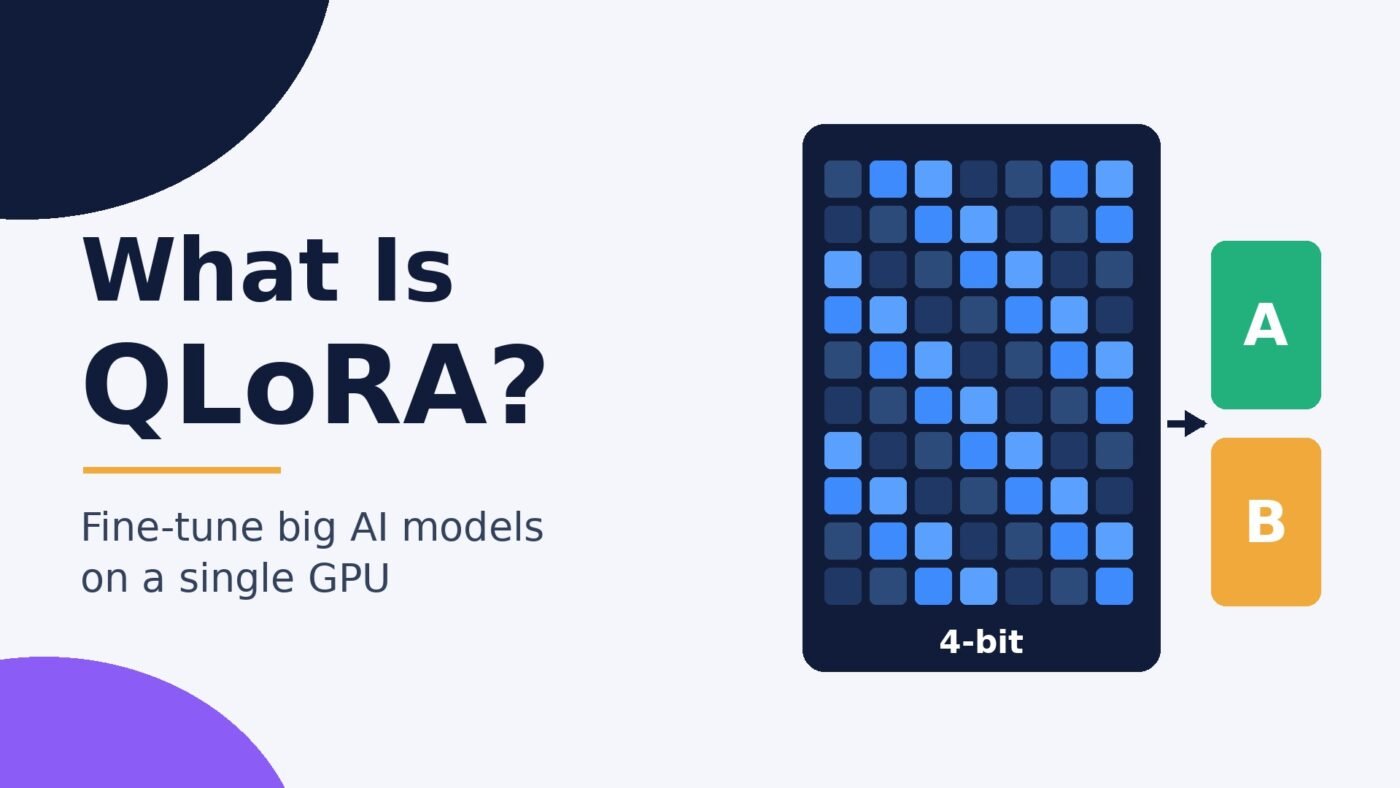
QLoRA (Quantized Low-Rank Adaptation) is a way to fine-tune a large language model on far less GPU memory: it stores the frozen base model in compressed 4-bit form and trains small LoRA adapter weights on top. Only the adapters learn, and the big model never has to sit in memory at full 16-bit size. In the 2023 QLoRA paper, researchers at the University of Washington reported that this was enough to fine-tune a 65-billion-parameter model on a single 48GB GPU while preserving full 16-bit fine-tuning task performance.
This guide explains what QLoRA is in plain English, the three tricks that make it work, how it compares with regular LoRA and full fine-tuning, how much GPU memory it really needs, and when it is (and is not) the right choice. If you are new to adapters, our explainer on what LoRA is is a good five-minute primer, but you can follow this page without it.
QLoRA in one sentence
QLoRA is LoRA fine-tuning on a 4-bit quantized base model. Two ideas are stacked together:
- LoRA reduces what you train. Instead of updating every weight in the model, you freeze it and train two small adapter matrices beside some of its layers.
- Quantization reduces what you store. The frozen weights are squeezed from 16 bits per number down to 4 bits, so the model takes roughly a quarter of the memory.
Put them together and you get a fine-tuning method that changes the model’s behavior through small trainable adapters while the base model sits in GPU memory in compressed form. The “Q” simply stands for quantized.
Why QLoRA was needed
Fine-tuning is how you teach a pretrained model a new style, format or specialty. The problem is memory. The QLoRA authors note that regular 16-bit fine-tuning of a LLaMA 65B model requires more than 780GB of GPU memory. That means a rack of data center GPUs, not one card.
LoRA already helped by shrinking the number of trainable parameters, but the frozen base model still had to be loaded at full 16-bit precision. Quantization could shrink models for running them (inference), but before QLoRA, the paper says, those techniques “only work for inference and break down during training.” QLoRA’s contribution was showing you could train through a 4-bit model without the quality collapsing. The authors reported cutting the 65B fine-tuning requirement from more than 780GB to under 48GB of GPU memory.
How QLoRA works
A useful way to picture QLoRA: the base model is a huge library kept in a zipped archive. Whenever a page is needed, it is briefly unzipped, read, and put back. Meanwhile, you write your corrections on a small notepad (the LoRA adapter), and only the notepad changes during training.
The paper introduces three techniques to make that work without losing accuracy, plus one key design rule.
1. 4-bit NormalFloat (NF4): smarter 4-bit numbers
With only 4 bits, each weight can take just 16 possible values, so the choice of those 16 values matters a lot. The weights inside trained neural networks tend to cluster around zero in a bell-curve (normal) shape. NF4 is a 4-bit data type designed for exactly that shape; the authors describe it as “information theoretically optimal” for normally distributed data, and they found it gave better results than plain 4-bit integers or 4-bit floats. Hugging Face’s documentation is blunt about it: “You should use NF4 for training 4-bit base models.”
2. Double quantization: compressing the compression notes
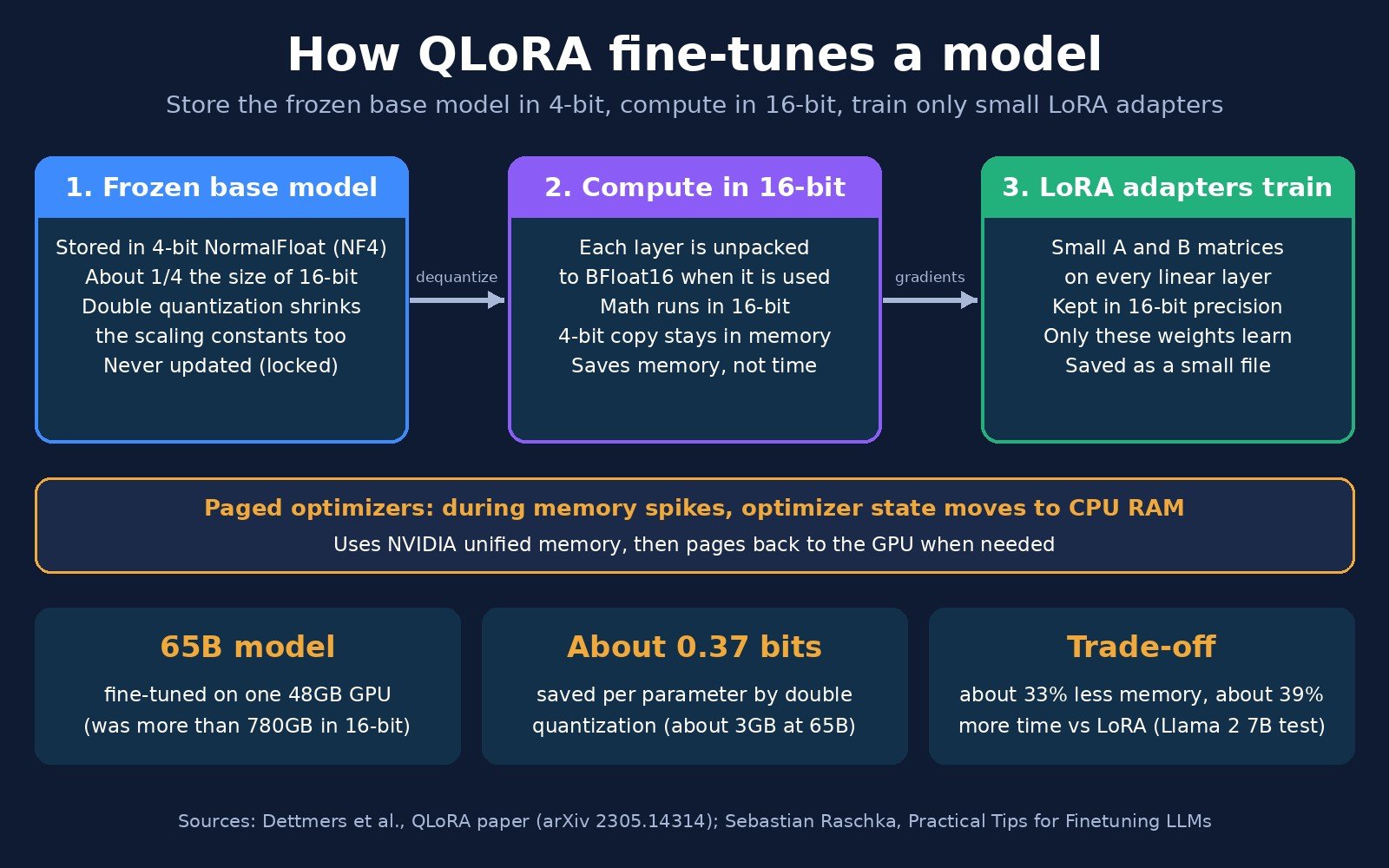
Quantization works in small blocks of weights, and each block needs a scaling number (a “quantization constant”) to turn its 4-bit values back into real ones. Those constants add up. Using 32-bit constants with a block size of 64, the paper calculates they cost 0.5 extra bits per parameter. Double quantization quantizes those constants too, saving about 0.37 bits per parameter, or approximately 3GB for a 65B model.
3. Paged optimizers: a safety valve for memory spikes
Training memory is not flat. Long input sequences can cause sudden spikes that crash a run with an out-of-memory error. QLoRA’s paged optimizers use NVIDIA’s unified memory feature so that the optimizer state is automatically evicted to CPU RAM when the GPU runs out of memory and paged back when needed. Think of it like a computer using its page file instead of crashing. (If the difference between GPU memory and system memory is fuzzy, see our guide to RAM vs VRAM.)
Storage type vs compute type: the part most people miss
QLoRA does not do its math in 4-bit. The paper describes one low-precision storage data type (usually 4-bit NF4) and one computation data type (usually BFloat16). Whenever a layer is used, its weights are dequantized to 16-bit, the calculation runs in 16-bit, and the gradients flow back through into the LoRA adapters, which stay in higher precision. The 4-bit weights themselves are never updated.
That is why QLoRA saves memory but not compute. As PyTorch’s torchtune team puts it, adapter parameters “are still held in the original precision, and activations, gradients, and optimizer states still exist in the higher precision.”
The design rule: put adapters on every layer
One finding from the paper matters if you ever run QLoRA yourself. The classic LoRA setup only adapts the attention query and value layers. The QLoRA team found that default could not match full 16-bit fine-tuning on large models, and that LoRA on all linear transformer block layers is required to match full fine-tuning performance. By contrast, they found the adapter rank (r) did not much affect results when adapters were on all layers. (New to the term? Our guide to transformer models explains what those layers are.)
QLoRA vs LoRA vs full fine-tuning
The short version: full fine-tuning updates everything, LoRA trains small adapters on a full-precision model, and QLoRA trains the same small adapters on a 4-bit model.
| Full fine-tuning | LoRA | QLoRA | |
|---|---|---|---|
| What gets trained | Every weight | Small adapter matrices | Small adapter matrices |
| Base model in memory | 16- or 32-bit, updated | 16-bit, frozen | 4-bit NF4, frozen |
| Compute precision | 16- or 32-bit | 16-bit | 16-bit (weights unpacked on the fly) |
| GPU memory | Highest | Medium | Lowest |
| Training speed | Slowest per run (most to update) | Fast | Slower than LoRA (extra unpacking) |
| Output | A full new model | A small adapter file | A small adapter file |
| Best for | Big budgets, maximum control | Enough VRAM, faster iteration | Limited VRAM, bigger models on one GPU |
Real measurements show the trade-off clearly. In his experiments fine-tuning a 7B Llama 2 model, machine learning researcher Sebastian Raschka reported standard 16-bit LoRA took 1.85 hours and 21.33GB of memory, while QLoRA took 2.79 hours and 14.18GB. That is roughly 33% less memory for 39% more training time, and he found model quality was barely affected. PyTorch’s torchtune tutorial saw a similar pattern on Llama 2 7B, with peak training memory of 15.57GB for LoRA vs 9.29GB for QLoRA.
So the honest summary of QLoRA vs LoRA: QLoRA trades speed for memory. If the model already fits comfortably for LoRA on your GPU, plain LoRA is usually faster. If it does not fit, QLoRA is often what makes the job possible at all.
How much GPU memory does QLoRA need?
It depends on model size, sequence length, batch size and which layers you adapt, so treat any table as a floor rather than a promise. The fine-tuning library Unsloth publishes minimum VRAM figures that show the gap between 4-bit QLoRA and 16-bit LoRA. It warns these are “the absolute minimum” and some models need more.
| Model size | QLoRA (4-bit) minimum VRAM | LoRA (16-bit) minimum VRAM |
|---|---|---|
| 3B | 3.5GB | 8GB |
| 7B | 5GB | 19GB |
| 8B | 6GB | 22GB |
| 14B | 8.5GB | 33GB |
| 32B | 26GB | 76GB |
| 70B | 41GB | 164GB |
Source: Unsloth requirements documentation. Unsloth uses its own memory optimizations, so other tools may need more.
For a sense of scale on consumer hardware, the original paper says Guanaco 33B can be trained on 24GB consumer GPUs in less than 12 hours, and Hugging Face’s docs describe fine-tuning a Llama-13b model on a 16GB NVIDIA T4 using nested (double) quantization with a batch size of 1.
What QLoRA gets right, and its trade-offs
Strengths
- Big models on one GPU. The headline result: 65B on a single 48GB card, which would otherwise need hundreds of gigabytes.
- Quality close to 16-bit fine-tuning. The paper’s chatbot family, Guanaco, reached 99.3% of ChatGPT’s performance level on the Vicuna benchmark after 24 hours of fine-tuning on a single GPU (an AI-judged chatbot benchmark from 2023, not a general measure of intelligence).
- Tiny output files. Like LoRA, you save a small adapter rather than a new copy of the whole model, so you can keep several task adapters for one base model.
- Well supported. It is built into Hugging Face Transformers and PEFT, Unsloth and torchtune, so you rarely need custom code.
Trade-offs and limits
- Slower training. Unpacking 4-bit weights on every pass costs time, as the 39% runtime increase in Raschka’s test shows.
- Not every claim was proven at the largest sizes. The authors write that they “did not establish that QLoRA can match full 16-bit finetuning performance at 33B and 65B scales” because of the cost of running that comparison.
- Hardware support varies. The popular bitsandbytes route lists NF4/FP4 quantization as needing an NVIDIA Pascal (GTX 10-series) or newer GPU on CUDA, with other backends (Intel, CPU) listed separately. On Macs, people usually reach for different tools.
- It does not fix bad data. QLoRA is a memory trick, not a quality trick. A small, messy dataset still produces a model that overfits or learns the wrong habits. The paper itself found that a small, high-quality dataset mattered more than size.
When to use QLoRA (and when not to)
QLoRA is a good fit when:
- The model you want to adapt does not fit in your GPU for regular LoRA.
- You are on a single consumer card (for example 12GB to 24GB) or a rented cloud GPU and want to keep costs down.
- You want a custom tone, format or domain behavior from an open-weight model and are happy to wait a bit longer per run.
Pick something else when:
- You have plenty of VRAM. Plain LoRA is usually faster for the same job.
- You need fresh or private facts, not new behavior. Retrieval is usually a better tool for knowledge; see what RAG is.
- Better prompts would do. Try clear instructions and examples first; fine-tuning of any kind is the heavier option.
- You are aligning to human preferences. That is a separate stage, such as RLHF, although adapters can be used there too.
How to run QLoRA: the tools and the four settings that matter
You do not need to implement QLoRA yourself. The common routes are:
- Hugging Face Transformers + PEFT + bitsandbytes. The original reference stack. The PEFT quantization guide walks through loading a model in 4-bit, preparing it with
prepare_model_for_kbit_training()and attaching a LoRA config. - Unsloth. A fine-tuning library focused on speed and memory savings, with notebooks and a desktop app for beginners.
- torchtune. PyTorch’s own fine-tuning library, with a step-by-step QLoRA tutorial for Llama 2 7B.
- The original code. The authors’ QLoRA repository on GitHub.
In the Hugging Face stack, four settings in BitsAndBytesConfig define the “Q” part, as shown in the PEFT docs:
BitsAndBytesConfig(
    load_in_4bit=True,                      # store the base model in 4-bit
    bnb_4bit_quant_type="nf4",              # use NormalFloat4
    bnb_4bit_use_double_quant=True,         # double quantization
    bnb_4bit_compute_dtype=torch.bfloat16,  # do the math in 16-bit
)
After that, the LoRA settings (rank, alpha, dropout and target modules) work the same way they do in regular LoRA. Following the paper’s finding, target all the linear layers rather than only query and value.
What you get after training
A QLoRA run produces a LoRA adapter, usually a small set of files, that sits on top of the original base model. You can then:
- Load the adapter with the base model each time you run it, which makes swapping between tasks easy.
- Merge the adapter into a 16-bit copy of the base model to get one standalone model for simpler serving.
- Convert and run it locally in tools such as Ollama, typically after merging and converting to a format the tool supports.
One point that confuses people: training in 4-bit does not mean your final model has to run in 4-bit. Training precision and serving precision are separate choices.
A simple example of when you would use QLoRA
Say a small business wants an internal assistant that writes product descriptions in its house style. It has a few thousand approved examples and one desktop with a 16GB graphics card. Regular LoRA on a mid-sized open model might not fit on that card. With QLoRA, the base model is stored in 4-bit, the team trains a small adapter on its examples overnight, and the result is a model that writes in the brand voice, with no data center GPUs needed. If the assistant also had to quote today’s prices, they would pair it with retrieval rather than retraining every time prices change.
Frequently asked questions
What is QLoRA in simple terms?
QLoRA is a memory-saving way to fine-tune a large language model. It stores the frozen base model in 4-bit form and trains small LoRA adapters on top, so you can customize big models on a single GPU instead of a cluster.
What does QLoRA stand for?
QLoRA stands for Quantized Low-Rank Adaptation. “Quantized” refers to storing the base model’s weights in 4-bit precision, and “Low-Rank Adaptation” (LoRA) is the adapter method used to train the model.
What is the difference between LoRA and QLoRA?
Both train small adapters on a frozen model. LoRA keeps the base model in 16-bit precision; QLoRA stores it in 4-bit NF4 and unpacks it to 16-bit for each calculation. QLoRA uses less memory but trains more slowly.
Is QLoRA worse than LoRA?
Usually only slightly, if at all. The QLoRA paper reported matching 16-bit fine-tuning performance in its tests, and independent experiments found quality barely changed. The main cost is longer training time, not accuracy.
Can I run QLoRA on a consumer GPU?
Yes. QLoRA was designed for that. The original paper reports training a 33B model on a 24GB consumer GPU, and smaller 7B to 8B models need far less VRAM. On the common bitsandbytes route you need an NVIDIA Pascal or newer GPU.
Does QLoRA make the model faster?
No. QLoRA reduces memory, not computation. Weights are unpacked to 16-bit for every calculation, so training is typically slower than regular LoRA. Its benefit is fitting larger models into the GPU you have.
The bottom line
QLoRA is LoRA with a compressed base model. By storing frozen weights in 4-bit NF4, compressing the quantization constants and paging optimizer memory when it spikes, it lets you fine-tune models that would otherwise need far more GPU memory, at the cost of slower training. If your model fits for regular LoRA, use LoRA. If it does not, QLoRA is the standard way to make it fit. For the bigger picture, see our guides to fine-tuning, LoRA and quantization in AI.

The Teck Hustlers Editorial Team covers technology, business, finance and gaming news for readers who want the story behind the headline. Every article is researched, written and edited by our in-house team, checked against company announcements, filings and reputable reporting, and updated when new facts emerge. We focus on what each development means for founders, professionals, investors and everyday users. Have a tip or a correction? Reach us through our contact page.