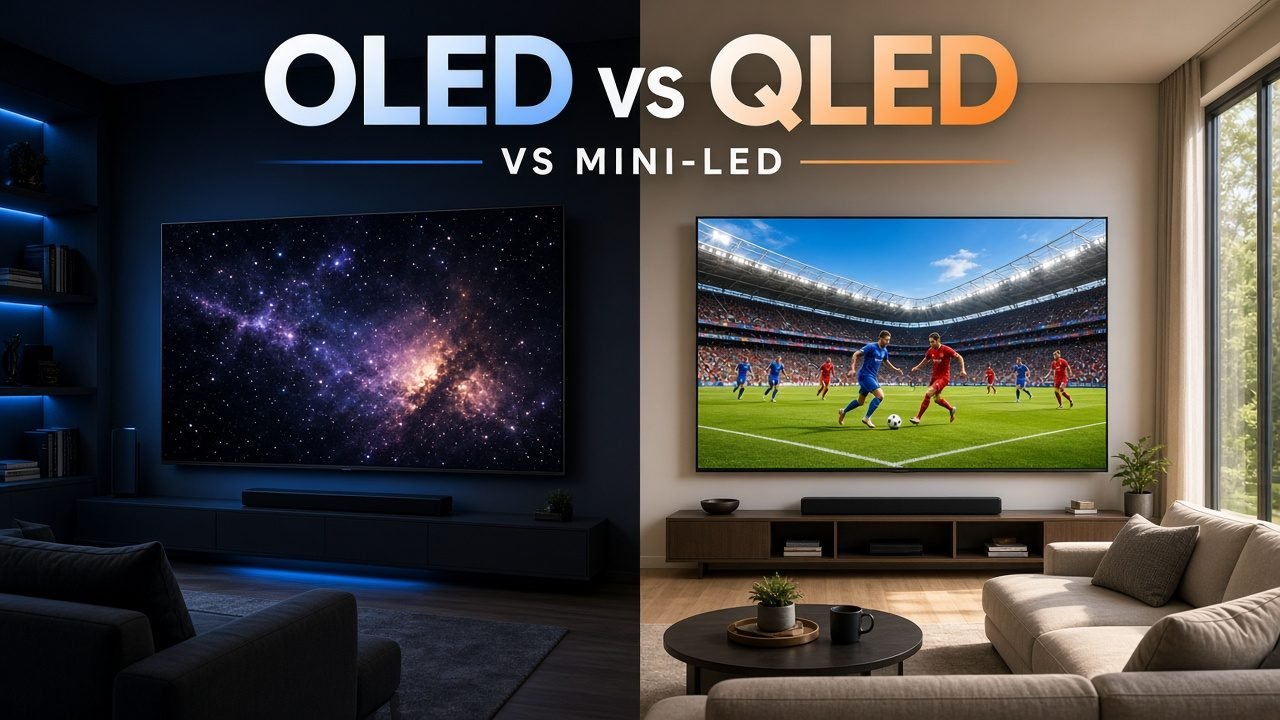
Shopping for a TV in 2026 still funnels most people into the same aisle question: OLED vs QLED. The names look alike, the marketing is loud, and half the boxes also say Mini-LED, Neo QLED, QNED, or QD-OLED. Here is the short version: neither wins every room—OLED (including QD-OLED) for dark-room contrast and motion clarity; quantum-dot LCD QLED—especially Mini-LED QLED—for bright rooms, large sizes, and buyers who want to skip OLED-style burn-in risk. Below: plain definitions, a four-way comparison table, a room-and-use decision guide, burn-in honesty, and a gaming note. No fake “best TV of 2026” crown—just how the panel families actually differ.
OLED vs QLED: which is better?
Neither is better for every room. OLED (including QD-OLED) is usually better for dark-room movies and contrast because each pixel makes its own light and can turn fully off. QLED—and especially Mini-LED QLED—is usually better for bright rooms, large screen sizes, and buyers who want maximum brightness and no OLED-style burn-in risk. Pick for your lighting and content first, then compare specific models. The table later keeps WOLED, standard QLED, Mini-LED QLED, and QD-OLED in separate columns so the names do not smear together.
Quick definitions (keep these distinct)
OLED (WOLED / tandem OLED)
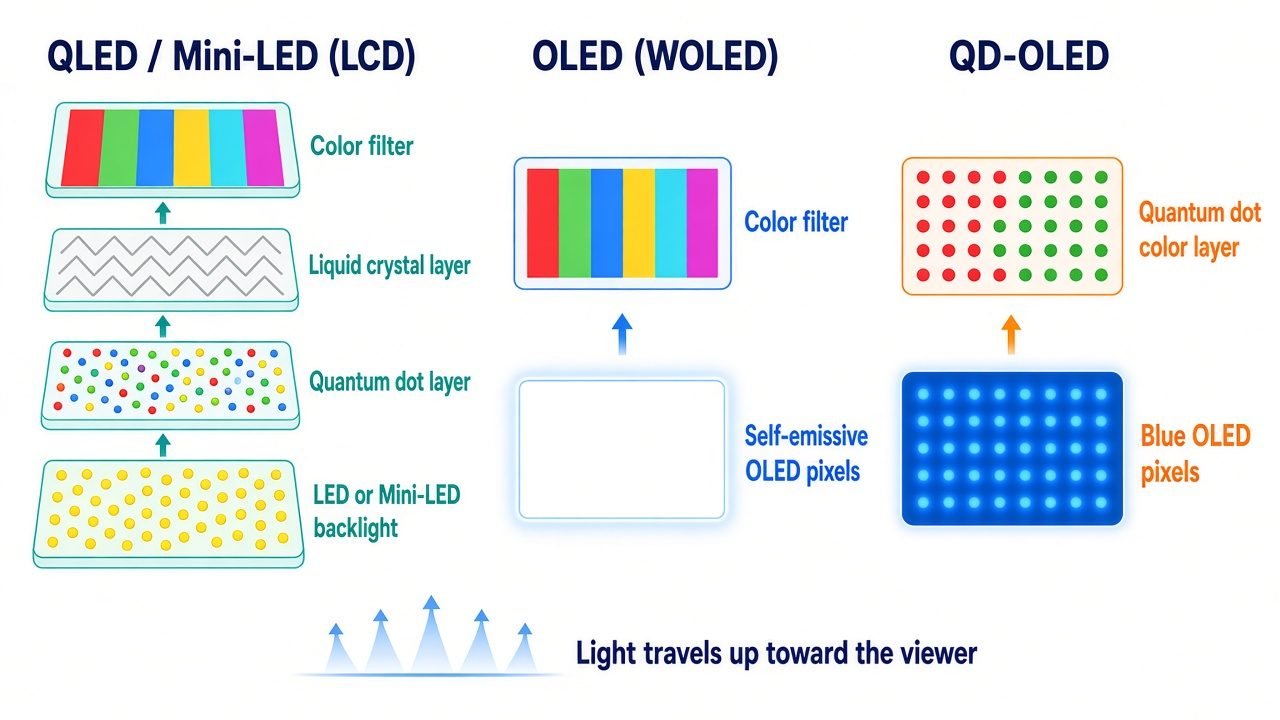
OLED means organic light-emitting diode: each pixel is self-emissive. Turn a pixel off and you get a true black with no backlight glow behind it. Most “standard” OLED TVs use WOLED panels (white OLED light plus color filters), supplied mainly by LG Display and sold under LG, Sony, Panasonic, Philips, and others. Flagship WOLEDs in 2025–2026 pushed brightness with Primary RGB Tandem OLED—a multi-stack panel approach that succeeded short-lived Micro Lens Array (MLA) designs on top models, as explained in What Hi-Fi?’s OLED vs QLED guide.
QLED (quantum-dot LCD)
QLED is still an LCD. An LED (or Mini-LED) backlight shines through liquid crystals, and a quantum-dot layer helps produce more vivid, efficient color than older phosphor filters. Samsung popularized the QLED name; Hisense, TCL, and others sell quantum-dot LCD sets too. LG’s related branding is often QNED (quantum dots + NanoCell marketing on Mini-LED LCD). Nothing in classic QLED is self-emissive—the backlight always exists.
Mini-LED QLED (Neo QLED / QNED-class)
Mini-LED packs thousands of tiny backlight LEDs into many local-dimming zones, then adds quantum dots. Contrast can get much closer to OLED than old edge-lit LCDs, and peak brightness is often excellent for daytime sports and HDR pop. You can still see blooming (halos around bright objects on dark backgrounds) because zones are not individual pixels. Samsung’s Mini-LED QLED branding is Neo QLED; other brands use their own Mini-LED + QD labels.
QD-OLED
QD-OLED is not QLED. It is a self-emissive OLED that uses blue OLED emitters plus quantum dots for color, instead of a WOLED-style white OLED + filter stack. Samsung Display makes these panels; they show up in Samsung’s S95-class sets and some Sony models. Same OLED family strengths (true blacks, no backlight blooming) with a different color path—and the same OLED longevity caveats. Sharing a “Q” and an “LED” in the marketing name does not make it a backlight LCD.
Comparison table: OLED vs QLED vs Mini-LED QLED vs QD-OLED
| Factor | OLED (WOLED / tandem) | QLED (standard FALD/edge LCD + QD) | Mini-LED QLED (Neo QLED / similar) | QD-OLED |
|---|---|---|---|---|
| How it makes light | Self-emissive pixels | LED backlight + LCD + QD film | Dense Mini-LED backlight + zones + QD | Self-emissive OLED + QD color |
| Black levels / contrast | Best (pixel off = true black) | Good–very good; limited by backlight | Near-OLED in dark scenes; some blooming | OLED-class blacks |
| Peak / full-screen brightness | Improving (tandem helps); full-screen usually lower | High | Highest class among common TVs | High for OLED family; check the model |
| Blooming / halos | None (no backlight) | Possible | Reduced vs older LCD; still possible | None |
| Viewing angles | Excellent | Fair–good (panel-dependent) | Fair–good | Excellent |
| Motion / response | Excellent | Good | Good | Excellent |
| Burn-in risk | Low but non-zero with static content | Negligible (OLED-style) | Negligible (OLED-style) | Low but non-zero (OLED family) |
| Best for | Dark rooms, movies, competitive clarity | Value, bright rooms on a budget | Bright rooms, sports, large sizes | Premium contrast + color/brightness mix |
| Watch-outs | Full-screen brightness; burn-in edge cases; price | Contrast/blooming; off-angle washout | Zone count ≠ magic; blooming; thickness | Price; still OLED longevity caveats |
Scores are directional for shopping—always check the specific model’s RTINGS (or equivalent) measurements. Example series to research (not endorsements): LG C/G-series WOLED, Samsung S95-class QD-OLED, Samsung Neo QLED / similar Mini-LED QLED lines from TCL or Hisense. Verify the current year’s letter suffix before you buy.
How to choose by room and use case
Dark or light-controlled room / movies
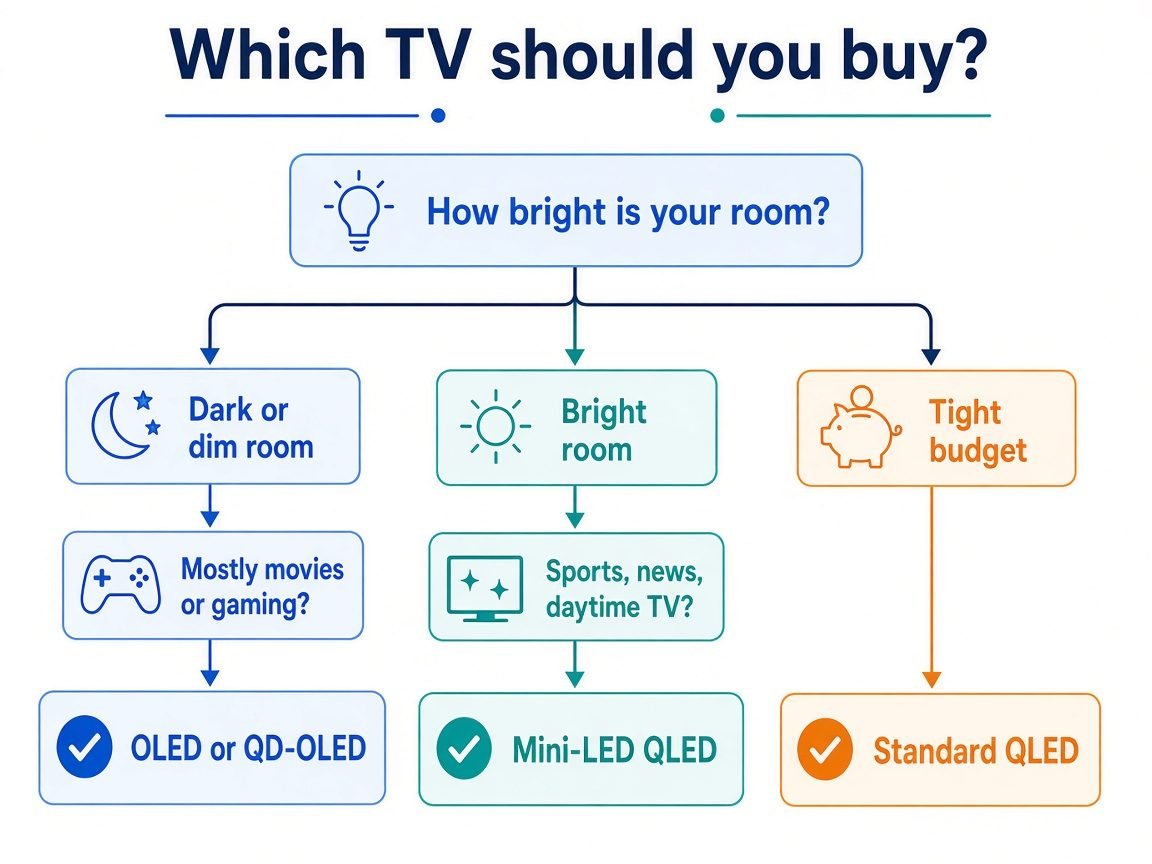
Prefer OLED or QD-OLED. When the room is dark, true blacks and infinite contrast matter more than who wins a peak-nit war. Nighttime movies, prestige TV, and dim home theaters are where self-emissive panels feel “expensive” in a good way.
Bright living room / daytime sports / news
Prefer Mini-LED QLED (or a genuinely bright QLED). Windows, skylights, and daytime sports need sustained brightness and punch. Check full-screen and near-full-screen brightness in reviews—not just a tiny HDR highlight window—because that is what daytime news and stadium broadcasts stress.
Mixed family use
Decide what you refuse to compromise. If most serious watching happens after dark and you care about cinema contrast, OLED/QD-OLED still wins. If the set lives in a bright open-plan room, kids leave cartoons on for hours, or you hate the idea of static logos, Mini-LED QLED is the calmer pick. Mixed use is fine on either—just match the primary room light and your burn-in comfort level.
Gaming (console / PC)
OLED usually wins on response time and black levels, which helps competitive clarity and dark-game shadow detail. Confirm the model’s HDMI 2.1 bandwidth, VRR, ALLM, and 120 Hz+ modes—not every “gaming TV” label is equal. If you leave the same HUD, Discord overlay, or desktop taskbar on for years at high brightness, weigh Mini-LED instead. For PC setups, also know your GPU and cable path: see our guides on how to check what GPU you have and USB-C vs Thunderbolt when you are driving a monitor-class display. Living-room console context sits next to pieces like our Apple TV gaming notes.
Brightness, contrast, and blooming (what the numbers mean)
Nits (cd/m²) measure luminance. Peak HDR “window” brightness (a small bright patch) can look spectacular on both OLED and Mini-LED. Full-screen brightness is a different story: many OLEDs dim when the whole panel is asked to stay bright, while strong Mini-LED sets often hold more punch for bright sports or daytime UI.
Perceived contrast is not the same as a peak-nit trophy. In a dark room, an OLED at a lower peak can still look brighter and more three-dimensional because blacks stay black. In a bright room, raw luminance and reflection handling matter more.
RTINGS’ QLED vs OLED comparison uses 2025 flagships as lab examples—the LG G5 WOLED and the Samsung QN90F Mini-LED QLED—and is explicit that there is no clear universal winner. On one of their HDR hallway scene photos, they label about 1,120 cd/m² on the G5 and 1,019 cd/m² on the QN90F. That is a scene-specific measurement on those models, not a rule that “all OLEDs beat all QLEDs” (or the reverse). RTINGS also notes QLEDs are on average slightly brighter than most WOLEDs in very bright scenes, while modern WOLEDs (MLA earlier; RGB tandem on sets like the G5) closed much of the gap—so you must read the chart for the exact TV.
Blooming is the soft glow around bright objects on Mini-LED/LCD. Zone count marketing helps, but it is not eight million independently controlled pixels. OLED and QD-OLED do not bloom from a backlight because there is no backlight.
Burn-in and longevity in 2026
OLED burn-in (permanent uneven wear from static bright elements) is still real, but it is not a guaranteed fate for mixed movie and streaming use. Risk rises when news tickers, channel bugs, score bugs, or game HUDs sit in one place at high brightness for very long stretches. Makers add pixel shift, logo luminance limits, and pixel-refresh cycles; those help, they do not rewrite physics.
Independent testing still matters. RTINGS runs accelerated longevity and real-life burn-in programs; an OLED-Info summary of RTINGS’ ~10,000-hour burn-in work reported that all 20 OLEDs in that test showed some image retention under harsh max-brightness static stress, while noting newer panels were much brighter than a 2017 reference. Read that as: extreme static use can still mark an OLED; everyday mixed content is a different workload. See also RTINGS’ own real-life burn-in test write-up and their broader QLED vs OLED guidance: for gamers or same-channel-all-day households, QLED is often the safer panel class; mixed viewing keeps OLED longevity in a more comfortable zone.
QLED and Mini-LED LCD avoid OLED-style organic pixel burn-in. They are not immortal: backlights, electronics, and even quantum-dot layers can age or fail in other ways. “No burn-in” is not “never degrades.”
Price, sizes, and “good enough” value
At the same diagonal, OLED usually costs more than a midrange QLED and often more than many Mini-LED sets. LCD/QLED lines still offer a wider ladder of sizes and street prices, especially as you climb toward 75–85″ and beyond, where OLED either gets scarce or jumps hard in price. Small OLEDs exist now (low-40s inches on some lines), but they are not always the bargain their size suggests.
Street prices move weekly around holidays, so treat any single screenshot as stale by next week. Shop the panel class that fits your room first, then compare current 55″ and 65″ offers in that class—entry WOLED vs mid Mini-LED is a common value cross-check—using recent reviews rather than MSRP banners.
OLED also shows up outside TVs. If you are curious how the same self-emissive idea lands on tablets or laptops, see our notes on the OLED iPad Mini chatter and the MacBook Pro / Pro Display XDR roundup—same “panel tech” mental model, different products.
FAQ
OLED vs QLED — which is better?
Neither wins for every room. OLED (including QD-OLED) is usually better for dark-room movies and contrast because each pixel makes its own light and can turn fully off. QLED—and especially Mini-LED QLED—is usually better for bright rooms, large screen sizes, and buyers who want maximum brightness and no OLED-style burn-in risk. Pick for your lighting and content first, then compare specific models.
What is the difference between QLED and QD-OLED?
QLED is a marketing name for LCD TVs that use a quantum-dot layer with an LED or Mini-LED backlight—the picture is still formed by liquid crystals and a backlight. QD-OLED is a self-emissive OLED panel that uses quantum dots for color; it belongs to the OLED family, not to backlight-based QLED, even though both names share “Q” and “LED.”
Is OLED burn-in still a problem in 2026?
Yes, it remains possible if bright, static elements (news tickers, channel bugs, game HUDs) sit on screen for very long periods, especially at high brightness—but mixed everyday movie/streaming use is much lower risk, and makers add pixel-shift and refresh mitigations. Independent long-run tests (notably RTINGS’ accelerated burn-in work) still show OLEDs can retain images under extreme static use; if your TV will show the same UI all day, Mini-LED/QLED is the safer panel class.
Is Mini-LED the same as QLED?
No. Mini-LED describes the backlight. QLED describes quantum-dot color on an LCD. Many of the best bright-room sets combine both (Mini-LED backlight + quantum dots), which is why “Neo QLED” and similar names show up together—but a cheap QLED can still be a conventional LED backlight without dense Mini-LED zoning.
Who should buy which?
- Dark room + movies/series: OLED or QD-OLED.
- Bright room + sports/news: Mini-LED QLED (or a bright QLED).
- Big size on a budget (roughly 75″+): usually Mini-LED/QLED value wins.
- Static UI / always-on dashboards: Mini-LED/QLED for burn-in peace of mind.
- Competitive gaming clarity: OLED if you mix content; confirm HDMI 2.1 / VRR / 120 Hz+.
Related reading
- SSD vs HDD: which one is better? — same plain comparison voice
- What is Wi-Fi 7? — streaming stack companion
- Apple HomeView vs Amazon Echo Show 8 — smart display sibling
- OLED iPad Mini price / release notes
- MacBook Pro / XDR display roundup
- USB-C vs Thunderbolt
- How to check what GPU you have
- Apple TV gaming console pivot
Bottom line: match the tech to the room first—OLED/QD-OLED for controlled light and contrast, QLED/Mini-LED for brightness, size, and static-logo calm—then read a model-specific review before you spend. Panel family is the filter; the individual TV is the purchase.

The Teck Hustlers Editorial Team covers technology, business, finance and gaming news for readers who want the story behind the headline. Every article is researched, written and edited by our in-house team, checked against company announcements, filings and reputable reporting, and updated when new facts emerge. We focus on what each development means for founders, professionals, investors and everyday users. Have a tip or a correction? Reach us through our contact page.