An honest review of Pikwizard’s free stock photo and video library — what you actually get for free, where it falls short, and how it stacks up against Pexels, Unsplash, and Pixabay.
Pikwizard at a glance — the headline numbers that tell you whether to bother.
If you’ve searched for free stock photos in the last few years, you’ve probably bumped into Pikwizard somewhere in your results. The pitch is straightforward: over a million royalty-free photos and videos, no attribution required, free for commercial use, and you don’t even need to make an account to download. That sounds too good to be true, which is exactly why most people land on a Pikwizard review — they want to know where the catch is.
There is a catch. It’s small, and for many users it doesn’t matter at all. But the existing reviews of Pikwizard are uniformly fluffy: “impressive collection,” “user-friendly interface,” “great for designers,” recycled marketing copy that tells you nothing about whether the platform actually works for your specific project. This review takes the opposite approach. It’s specific, comparison-driven, and honest about where Pikwizard wins and where you should go elsewhere.
If you’re in a hurry: Pikwizard is genuinely solid for business and lifestyle imagery, has unusually permissive licensing terms, and offers about a million assets — most of which are completely free. It’s smaller than its main competitors, and weaker for artistic work and free video. For a working freelancer, marketer, or content creator, it’s worth a bookmark. For most users, it’ll be one platform in a stack of three or four. The longer answer follows.
What Is Pikwizard, Actually?
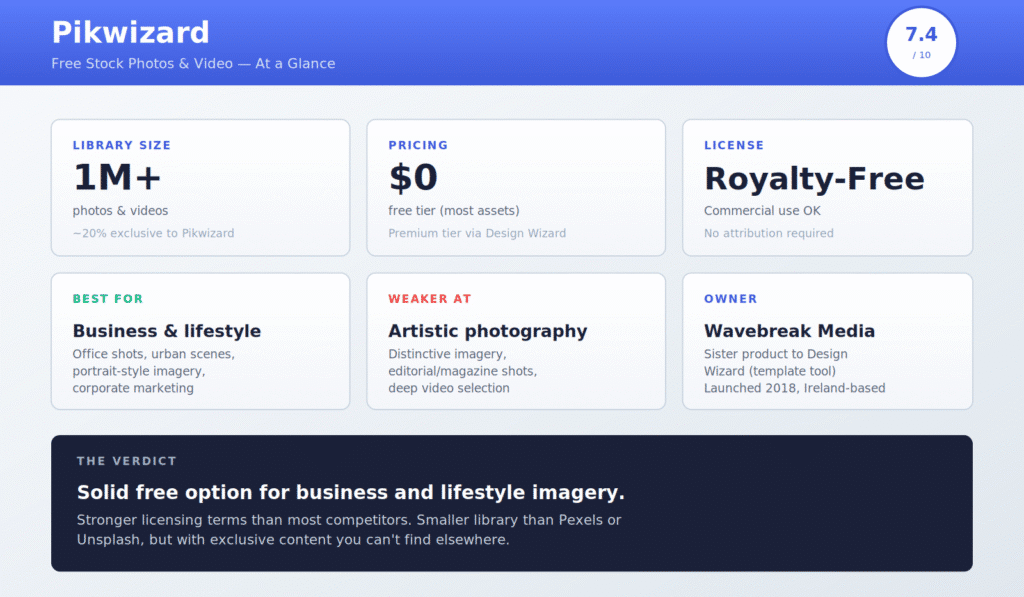
Pikwizard is a stock content library run by Wavebreak Media, an Ireland-based digital media company that also operates Design Wizard — a template-based design tool that competes with Canva. The two products are sibling services and share a parent company; you can move assets from Pikwizard into Design Wizard with a single click for editing. The platform launched in 2018 and has grown its library to roughly one million photos, videos, vectors, and transparent-background PNG files.
The business model is freemium. The free tier is the meat of what the platform offers — you can download a substantial portion of the library without paying a cent, without registering, without giving up an email address. Some assets are marked as Premium, which means they sit behind a Design Wizard subscription paywall and are watermarked until you pay. The mix between free and Premium varies by category; in business and lifestyle photography, most of what you see is free. In video and the most recent uploads, more of it tends to be Premium.
Two things distinguish the platform from its larger competitors. First, around 20% of the library is exclusive to Pikwizard, meaning you won’t find those specific images on Pexels, Unsplash, or Pixabay. The Geek Unicorn blog quotes the 20% exclusivity figure, citing the platform’s own claims, and a manual sample search backs it up — there’s a real chunk of urban and business imagery that doesn’t surface on the bigger sites. Second, Pikwizard’s licensing is uncomplicated in a way that some free stock sites aren’t, with no “editorial use only” gotchas to watch out for on most assets.
Pikwizard Pricing: Is It Really Free?
Yes. The free tier is real, not a teaser.
Here’s how the pricing actually works. The free tier gives you access to the bulk of the platform’s library — over 800,000 of the roughly one million assets, by the platform’s own numbers — at full resolution, with no attribution required, for both personal and commercial use. You don’t need to register, you don’t need to log in, you don’t need to verify an email. You arrive at the site, search for an image, click download, and the file lands on your computer. That’s it.
The Premium tier — accessed through Design Wizard’s subscription — adds three things. The first is access to the most recent uploads (recently added images stay Premium-only for a window before being released to the free tier in many cases, though not all). The second is a deeper video library; many of the high-quality video clips are gated to Premium. The third is the broader Design Wizard product itself, which gives you template-based design tools, brand kits, and other features competing with Canva Pro. Design Wizard’s Pro plan is $9.99/month billed monthly, or $89/year (about $7.42/month) billed annually, with team plans available at higher tiers. Pricing has shifted multiple times since launch — check the current rate on the Design Wizard site directly rather than trusting any review’s quoted figure, including this one.
If you’re trying to decide whether the Premium tier is worth it, the honest answer is: probably not, unless you specifically want Design Wizard’s design tools. The free tier’s library is large enough that most casual users won’t run into its limits. If you do want a paid stock subscription with broader scope, Envato Elements ($16.50/month) and Storyblocks ($19/month) offer significantly more total content for similar money.
Pikwizard vs Pexels vs Unsplash vs Pixabay
This is the comparison most readers care about. Pikwizard exists in a competitive space, and how it stacks up against the three biggest free platforms determines whether it’s worth your bookmark.
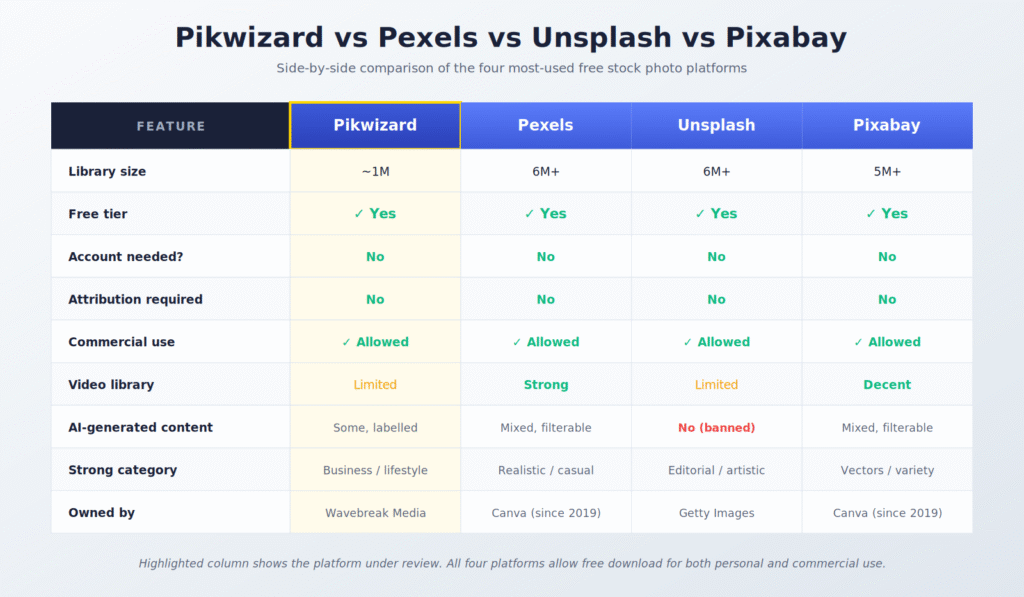
Side-by-side comparison across the metrics that actually affect daily use.
The headline difference is library size. Pexels and Unsplash both report library sizes north of six million photos, plus video collections in the millions. Pixabay claims similar scale with a heavier emphasis on vectors and illustrations. Pikwizard’s roughly one million assets is, in straight library-size terms, five to six times smaller. For high-volume users searching niche topics, this gap shows up. A search for something obscure will return more options on Pexels.
On license terms, the four platforms are essentially equivalent — all four offer royalty-free, attribution-not-required, commercial-use-allowed licenses. Where they differ is in execution. Unsplash explicitly prohibits AI-generated imagery in its library, taking a hard line on the AI-vs-photography question. Pexels and Pixabay both allow AI-generated content with clear filtering options to exclude it. Pikwizard sits in the middle: there’s some AI content in the library, labelled, but the platform hasn’t made a definitive policy statement either way.
Where Pikwizard pulls ahead is in two specific categories: business stock and exclusive content. For corporate and office imagery, Pikwizard’s library punches above its weight — the curation favours commercially polished compositions, and the photographers contributing seem to skew toward people who shoot professional-looking stock rather than artistic personal work. For the roughly 20% of content that’s platform-exclusive, you’re getting genuine differentiation. The kind of generic office handshake that appears on every blog and every B2B website, you can find on Pexels or Pikwizard equally. The specific Pikwizard-exclusive image of a focused marketing team, you can’t.
Where Pikwizard falls behind is in artistic work and free video. Unsplash dominates editorial and magazine-style photography — its photographers tend to be working professionals contributing personal projects, and the curatorial sensibility skews toward distinctive imagery rather than generic stock. If you want an evocative photo for an essay or a homepage hero image with personality, Unsplash is the right starting point. For video, Pexels Videos has built a deep free library that Pikwizard simply doesn’t compete with on the free tier.
What’s Actually in the Library?
The high-level numbers don’t tell you whether Pikwizard has the kind of images you actually need. Here’s a category-by-category breakdown based on hands-on browsing through the platform’s main verticals.
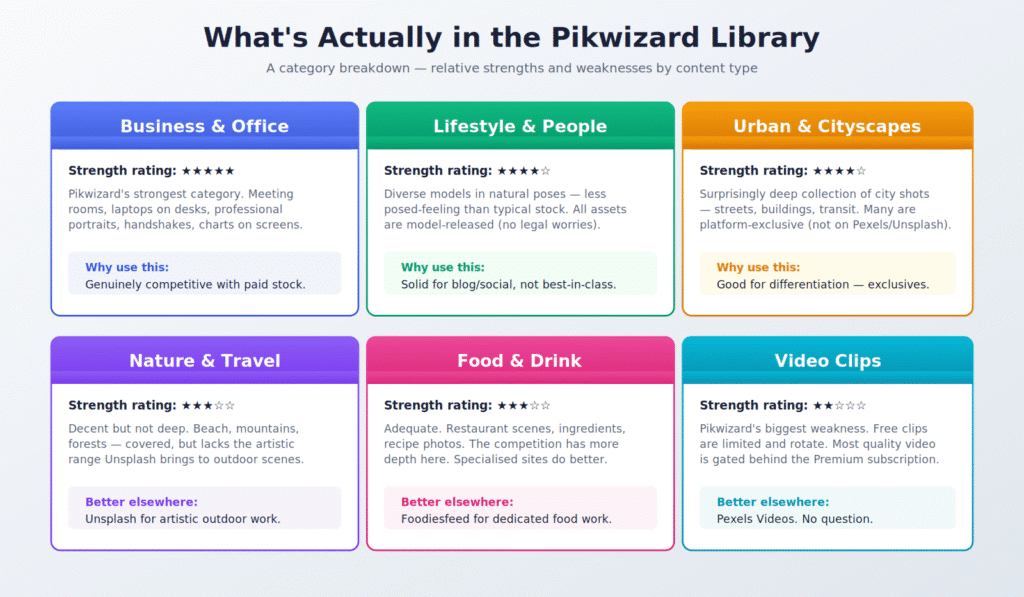
Business and office imagery (★★★★★)
This is where Pikwizard genuinely competes with paid services. Meeting rooms, professional portraits, laptops on desks, charts on screens, handshakes — every variant of the corporate stock photo is well represented, and the quality is consistent. Many of the models in the photos are diverse and posed in natural-looking ways rather than the awkward smile-at-camera stiffness that plagues older free libraries. If you run a B2B blog, an agency site, or any kind of professional services marketing, this category alone justifies the bookmark.
Lifestyle and people (★★★★☆)
Solid, with a useful detail: every photo featuring identifiable people is model-released. That means you don’t have to worry about implied endorsements or commercial-use restrictions tied to specific recognisable individuals. The catalogue covers most lifestyle scenarios — travel, family, fitness, food, friendship — at a quality level competitive with Pexels but below Unsplash in terms of artistic distinctiveness. Good for blog and social use, less ideal if you’re after something visually unique.
Urban and cityscape (★★★★☆)
A surprise strength. Pikwizard’s urban imagery — streets, architecture, public transport, retail interiors — is genuinely well-stocked, and a meaningful portion is platform-exclusive. If you’re building city-related content (travel blogs, real estate marketing, urban planning posts) this is one of the few areas where Pikwizard outperforms the bigger libraries on specificity rather than volume.
Nature and travel (★★★☆☆)
Adequate but not deep. Beach shots, mountains, forests — the standard outdoor categories are covered with respectable photos, but the artistic range is narrow. For visual essays about nature or travel content with personality, Unsplash’s outdoor library is significantly stronger. Pikwizard’s nature work tends toward the polished-postcard end of the spectrum rather than the moody and distinctive.
Food and drink (★★★☆☆)
Acceptable. There’s enough content for general blog and recipe use, but nothing about Pikwizard’s food library is special. For dedicated food work — restaurant marketing, recipe blogs, culinary editorial — Foodiesfeed remains the better-curated specialist option, and Unsplash has a deeper artistic food library.
Video clips (★★☆☆☆)
Pikwizard’s biggest weakness. The free video library is real but limited — a few hundred clips at any time, rotating periodically, with the most recent and highest-quality content gated behind Premium. For free stock video specifically, Pexels Videos has won this category. There’s no good reason to start a video search on Pikwizard when Pexels exists.
The Pikwizard License: What You Actually Can and Can’t Do
Stock photo licenses are where most users get tripped up. The headlines are usually clear (“royalty-free, no attribution!”), but the fine print contains restrictions that matter for specific use cases. Pikwizard’s license is, by stock photo standards, unusually permissive — which is the platform’s strongest selling point relative to free competitors.
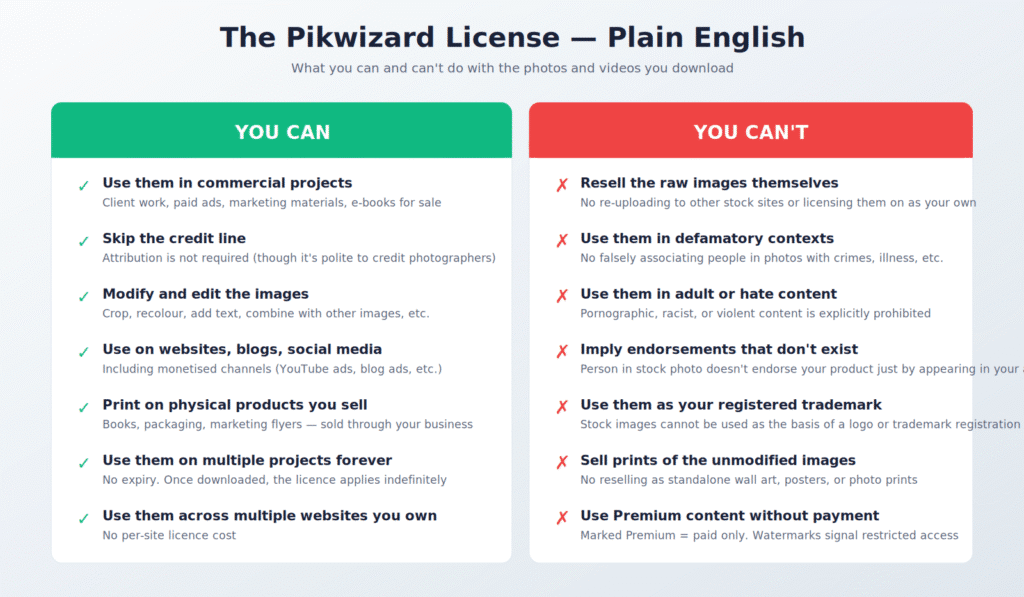
On the permitted side, you have most of what a working creator actually wants. Commercial use is explicitly allowed, including paid client work, monetised social media, advertising, and printed marketing materials. Attribution is not required, though it’s polite to credit individual photographers when reasonable. You can modify and edit images freely — crop, recolour, layer, combine, add text. The license has no expiration, so once you’ve downloaded an asset you can use it for projects in perpetuity. There’s no limit on how many websites you can use a given image across, no per-project license fee structure.
On the restricted side, the prohibitions are mostly common sense. You can’t resell the raw images themselves — no re-uploading them to another stock site under your name, no licensing them on as if you owned them. You can’t use them in defamatory contexts (no falsely associating someone in a stock photo with a crime or scandal), in pornographic content, in hate speech contexts, or in ways that imply someone in the photo endorses your specific product. You can’t register a stock image as your trademark or logo. You can’t sell prints of the unmodified images as standalone wall art.
The defamatory-context restriction is the one that most often surprises bloggers. If you’re writing an article about, say, workplace harassment, you cannot illustrate it with a stock photo of an identifiable person looking distressed and imply that the person in the photo is a victim or perpetrator. Most stock licenses include this restriction; it just becomes practically relevant when you’re choosing imagery for sensitive editorial topics.
The Honest Pros and Cons
Most reviews of free stock platforms read like marketing copy because the writer doesn’t actually use the platform. After several years of intermittent Pikwizard use across blog work and client projects, here are the actual pros and cons that matter.
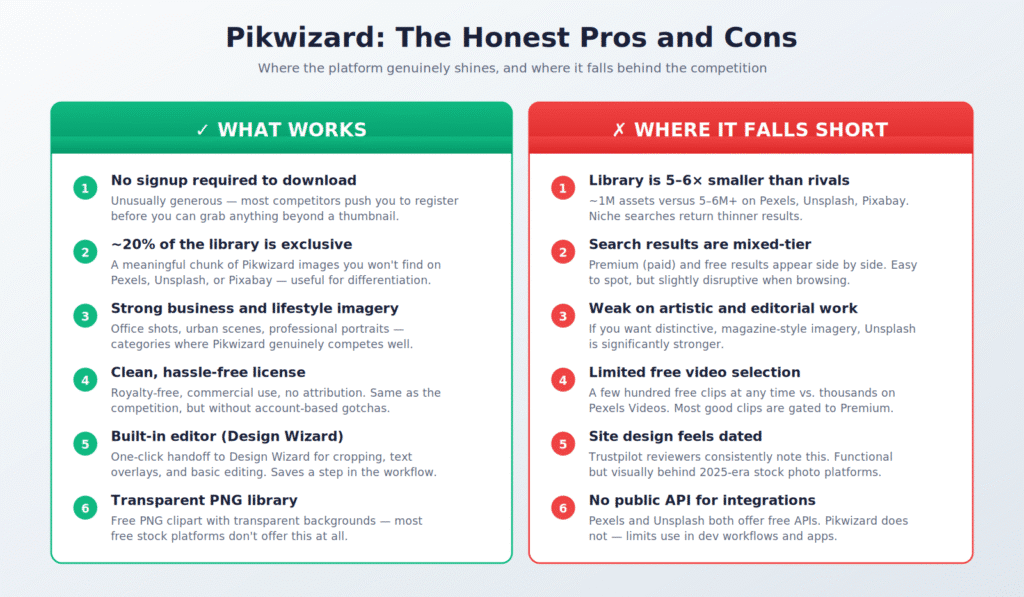
The biggest single advantage is the no-signup-required download flow. It seems trivial until you’ve spent twenty minutes battling Adobe Stock’s account creation process, or hit Shutterstock’s email-gate-then-trial-then-cancellation funnel. Pikwizard skips all of that. Click download, get the file. For someone using stock imagery as a regular part of their work, the time saved adds up.
The second meaningful advantage is the exclusive content. The 20% of the library you can’t get elsewhere is — for many users — the actual reason to bookmark the site. If you write content about generic topics (productivity, business, technology, lifestyle) and you’re tired of seeing the same Pexels and Unsplash photos on every competitor blog, Pikwizard’s exclusive pool gives you visual differentiation.
The biggest disadvantage is library depth. One million assets sounds like a lot until you compare it to six million on Pexels. For mainstream searches, Pikwizard returns enough results. For niche or specific searches, you’ll hit the bottom of the well faster than on the bigger platforms.
The second meaningful disadvantage is the dated site design. Trustpilot reviewers consistently note this, and they’re right. The site works fine — search is fast, downloads are quick, navigation is intuitive — but the visual design feels like a 2018 stock photo platform rather than a 2026 one. The Premium upsell is more aggressive than on Pexels or Unsplash, with paid results interspersed in free searches in a way that’s slightly distracting (though always clearly labelled).
The third issue worth flagging: there’s no public API. Pexels and Unsplash both offer free APIs that integrate with design tools and apps; their imagery shows up natively in Figma, Notion, Canva, and dozens of other platforms. Pikwizard hasn’t built or exposed an API equivalent, which limits its use in dev workflows.
Who Should Use Pikwizard?
Direct answer: Pikwizard makes sense for three specific types of user.
First, B2B and corporate marketers. The library’s strongest category — business and office imagery — happens to be where free stock most often falls short. If you regularly need photos of professionals doing professional things, Pikwizard’s selection is genuinely competitive with paid stock services and is one of the better free options for that specific use case.
Second, agency designers working across multiple client projects. The combination of strong licensing, no signup, and Design Wizard editor integration makes the platform efficient for high-volume client work where you don’t want to expose every project to a different platform’s account requirements.
Third, anyone who’s tired of seeing the same Pexels and Unsplash photos on every blog they read. Pikwizard’s exclusive content gives you visual differentiation that the bigger libraries can’t, simply because their photos appear everywhere.
Pikwizard makes less sense for two types of user. Editorial and magazine designers should default to Unsplash, which has a far deeper library of artistic and distinctive work. Video-heavy creators should default to Pexels Videos, which has more free clips than Pikwizard’s free tier could fit on a single landing page.
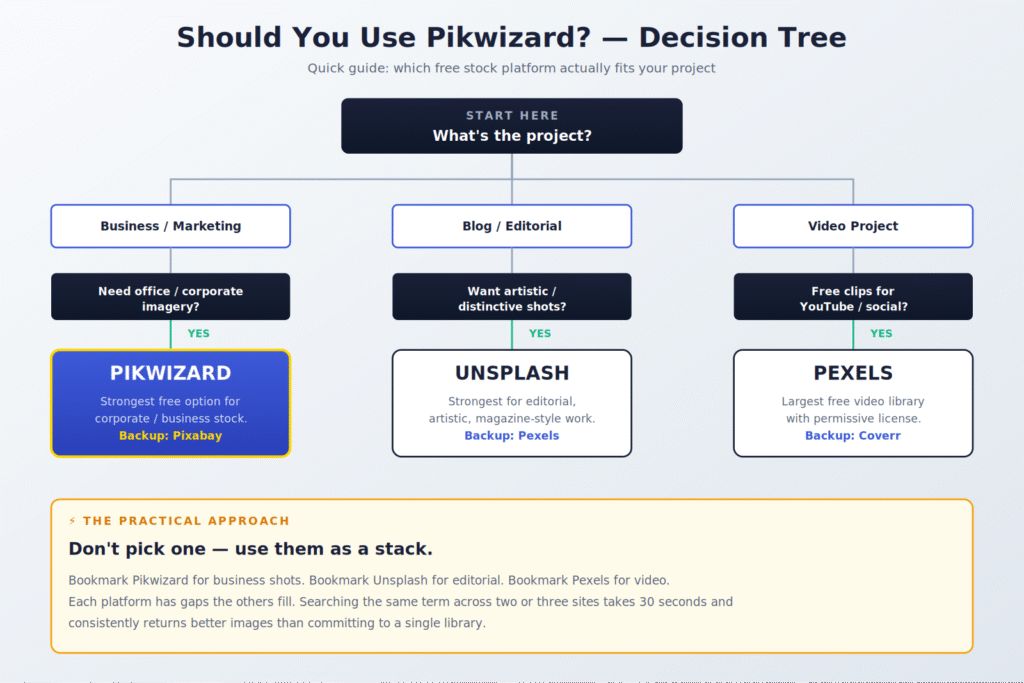
The most practical recommendation isn’t to pick one platform — it’s to use them as a stack. Bookmark Pikwizard for business and exclusive imagery. Bookmark Unsplash for editorial work. Bookmark Pexels for video. When you need a photo, search the same term across two or three sites in 30 seconds; you’ll consistently find better images than committing to any single library. Free stock sites are not mutually exclusive, and treating them as such is the most common mistake newer users make.
Pikwizard Alternatives Worth Knowing About
Beyond the big three competitors, there are several specialised free stock platforms worth bookmarking depending on your work. Most of these aren’t direct Pikwizard substitutes — they fill specific gaps in the broader free stock ecosystem.
- Foodiesfeed — specialist food photography. If you’re working on a recipe blog, restaurant site, or culinary editorial, the curation is significantly tighter than any general-purpose platform.
- Burst by Shopify — specifically built for e-commerce. Strong product shots, retail imagery, business stock. Free, no attribution.
- Coverr — free video clips, simpler than Pexels Videos and with a curated rather than exhaustive library. Worth knowing if you’re doing video work.
- Reshot — “Handpicked, non-stocky images.” The photos genuinely don’t feel like stock — useful when you want something with character.
- Kaboompics — a Polish-based free stock site with a strong magazine sensibility. Unsplash-quality artistic work in a smaller catalogue.
- Affect the Verb — focuses on inclusive imagery featuring LGBTQ+ subjects and people of colour. Vital if your audience or content needs better representation than mainstream stock provides.
Frequently Asked Questions
Is Pikwizard really free?
Yes. The free tier is genuine and includes commercial use without attribution. You don’t need to register or provide an email to download free assets. The platform also has a Premium tier accessed via Design Wizard subscription, which gates a subset of newer and higher-quality content, but the free portion is fully usable on its own.
Do I need to credit Pikwizard or the photographer?
No. Attribution is not required by the license for either free or Premium tier content. Crediting individual photographers is polite when you can identify them, but it’s not legally required.
Can I use Pikwizard images for clients and commercial work?
Yes. The license explicitly permits commercial use, including paid client work, advertising, monetised social media, and printed marketing materials.
Is Pikwizard better than Pexels?
It depends on what you need. Pexels has a far larger library (6M+ assets vs 1M), a stronger free video collection, and a public API for integrations. Pikwizard has a tighter focus on business stock, around 20% exclusive content, and a no-signup download flow. For most users, Pexels is the better default; for business and corporate imagery specifically, Pikwizard is competitive.
Is Pikwizard safe to use? Do I need an account?
Yes, it’s safe — the platform doesn’t have known data breaches, and you can browse and download anonymously without creating an account. Premium subscribers go through standard payment processing via the Design Wizard side. Free use requires nothing more than visiting the site.
Does Pikwizard have AI-generated images?
Some, yes. The platform has been adding AI-assisted assets to its library, primarily on the Premium side, with these typically labelled. If you specifically want to avoid AI-generated images, Unsplash has a public policy banning them outright; Pikwizard does not.
Can I sell prints of Pikwizard images?
No, not as standalone prints of the unmodified images. The license prohibits selling photos as wall art, posters, or photo prints in their original form. You can use them within a larger printed product (a book, a marketing piece) that you sell, but you can’t sell the photo itself as the primary product.
What happens if I download a Premium image by mistake?
Premium images are watermarked, so you’d notice immediately. The platform clearly marks Premium content with badges and watermarks before download. If you need an asset and find it’s Premium, your options are: subscribe to Design Wizard, find a similar free asset, or check whether the same content is available on a competing platform’s free tier (it sometimes is).
Why does Pikwizard show paid images in free search results?
It’s a freemium-platform standard practice — mixed-tier search results give the platform a chance to upsell you to Premium. Pixabay and Pexels do this less aggressively; Shutterstock and Adobe Stock do it more. Pikwizard sits in the middle. Premium results are always clearly labelled, so you can avoid them by checking before clicking download.
Final Verdict
Pikwizard is a solid free stock photo platform that quietly does several things right: it doesn’t gate you behind a signup, it has unusually clean licensing, it offers genuine exclusive content you can’t find on the bigger sites, and its strongest category — business and corporate imagery — happens to be one of the most commercially useful for working creators. It’s not the biggest free library, it’s not the prettiest site design, and it’s not the right choice for editorial or video-heavy work. But for a specific set of users — B2B marketers, agency designers, and anyone tired of generic stock — it earns its bookmark.
The honest recommendation is the one most reviews avoid because it doesn’t make for a clean conclusion: don’t ask whether Pikwizard is the best free stock platform, because there isn’t one. Treat free stock libraries as a stack — Pikwizard for business stock, Unsplash for artistic work, Pexels for video, and a specialist or two for the categories that matter to your specific work. Searching across multiple platforms takes seconds and consistently produces better imagery than committing to any single one. That’s the boring, accurate answer.
If you’re trying to decide whether to add Pikwizard to your stack: the time investment is zero (no signup, no email), the library has real exclusive content worth knowing about, and the licensing is among the most permissive in the free-stock space. It’s a low-risk addition. The bigger question — whether to upgrade to the Premium / Design Wizard tier — is a separate decision driven mostly by whether you want Design Wizard’s design tools, not whether you need Pikwizard’s stock library.

The Teck Hustlers Editorial Team covers technology, business, finance and gaming news for readers who want the story behind the headline. Every article is researched, written and edited by our in-house team, checked against company announcements, filings and reputable reporting, and updated when new facts emerge. We focus on what each development means for founders, professionals, investors and everyday users. Have a tip or a correction? Reach us through our contact page.