Most bad AI answers start with a vague prompt. The fix is rarely a secret trick: give the model the details you would give a new colleague. Below is the simple formula behind good prompts, then 30 copy-ready AI prompt examples. Swap the [brackets] for your details; they work in ChatGPT, Gemini, Claude or Copilot.
What makes a good AI prompt?
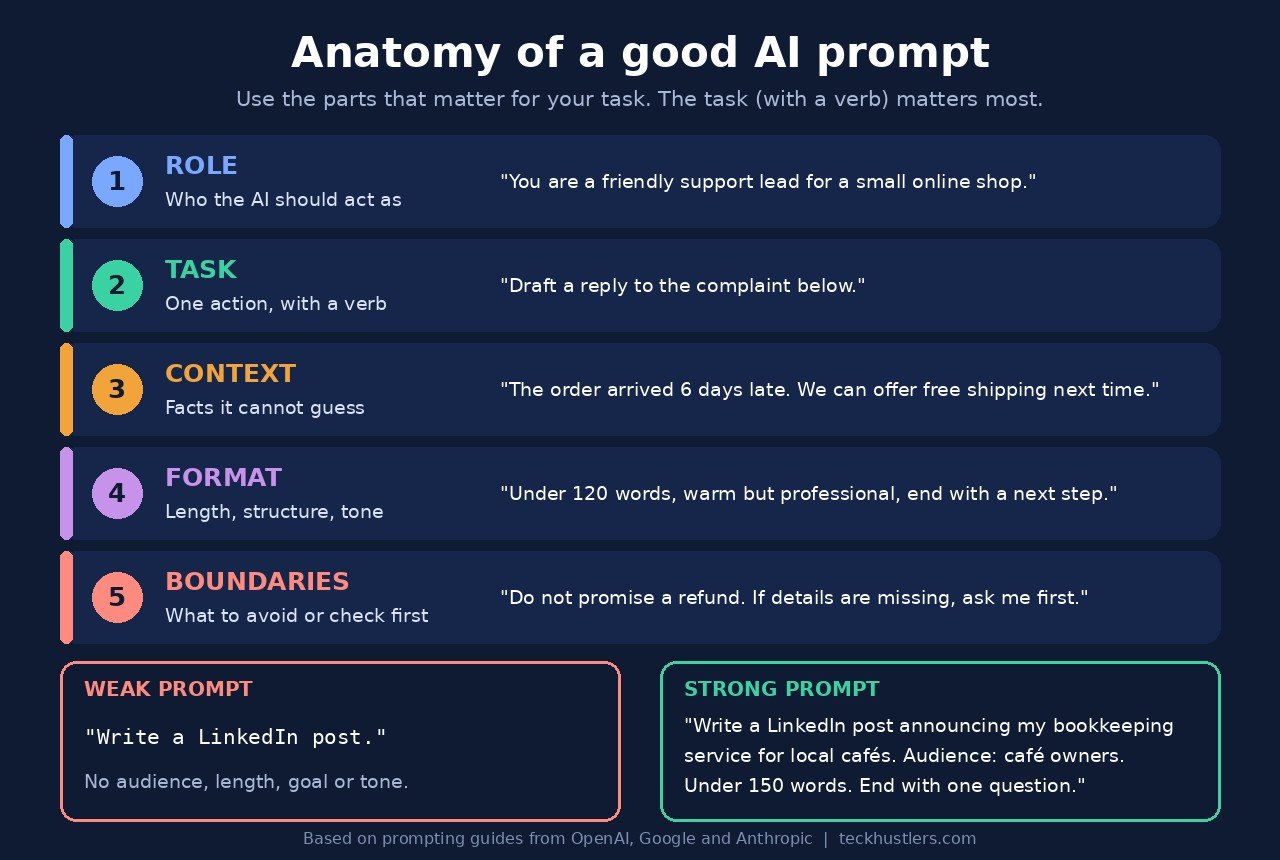
A good AI prompt tells the model who to be, what to do, what it needs to know, what the answer should look like, and what to avoid. You do not need every part every time. Add detail when it would change the result.
The big AI companies all say the same thing in slightly different words. Google’s Gemini guide lists four areas: persona, task, context and format, and says the verb in the task is the most important part (Google Workspace). OpenAI’s ChatGPT guide suggests goal, context, output and boundaries, and says to use only the parts that help (ChatGPT Learn). Anthropic tells people to treat Claude like “a brilliant but new employee who lacks context on your norms and workflows” (Anthropic).
Length matters less than detail, but most people write too little. Google says that, based on what it has learned from users, the most useful prompts average around 21 words with relevant context, while the prompts people actually try are usually under nine words (Google Gemini for Workspace prompting guide). If you want the theory behind all this, read our plain-English guide to what prompt engineering is.
The 5-part prompt formula
Here is that advice combined into one checklist. Use the parts that matter for your task.
| Part | What to write | Example |
|---|---|---|
| 1. Role | Who the AI should act as, or who the answer is for | “You are a friendly customer support lead for a small online shop.” |
| 2. Task | One clear action, starting with a verb | “Draft a reply to the complaint below.” |
| 3. Context | Facts, audience, goal, pasted material | “The order arrived 6 days late. We can offer free shipping on the next order.” |
| 4. Format | Length, structure, tone, layout | “Under 120 words, warm but professional, end with one clear next step.” |
| 5. Boundaries | What to avoid, what not to change, what to do if unsure | “Do not promise a refund. If information is missing, ask me first.” |
Put together, that becomes a prompt anyone can reuse:
You are a friendly customer support lead for a small online shop. Draft a reply to the complaint below. The order arrived 6 days late, and we can offer free shipping on the next order. Keep it under 120 words, warm but professional, and end with one clear next step. Do not promise a refund. If anything important is missing, ask me before writing.

Complaint: """[paste the customer's message]"""
The triple quotes mark where your pasted text starts and ends, a habit OpenAI and Google both recommend in some form (quotes, Markdown headings or XML-style tags) (OpenAI, Google AI for Developers).
Weak vs strong prompt examples
Each strong version adds only what the model could not guess.
| Weak prompt | Strong prompt | What changed |
|---|---|---|
| Write a LinkedIn post. | Write a LinkedIn post announcing that I now offer bookkeeping for local cafés. Audience: café owners. Under 150 words, plain language, one question at the end to invite comments. | Topic, audience, length, call to action |
| Fix my code. | This Python function should return only active users but returns an empty list. Find the bug, explain it in one paragraph, then show the corrected function. Code: “””[paste]””” | Expected vs actual behavior, output order, pasted input |
| Give me business ideas. | Suggest 10 service side hustles I could start with $200 or less, using my skills in [skills]. For each, give the first customer I could approach and one risk. | Budget, skills, useful columns |
| Summarize this. | Summarize the article below in 5 bullet points for a busy manager. Put the main decision or takeaway first. Quote the article for any figure you mention. | Reader, format, priority, accuracy check |
AI prompt examples for work
Email, meetings and updates. Always read the result before you send it.
1. Reply to a tricky email
Draft a reply to the email below. I want to say no to the new deadline of [date] but offer [alternative]. Tone: polite and firm. Under 150 words. Email: """[paste]"""2. Turn meeting notes into an update
Turn these meeting notes into a short update for [team]. Start with decisions made, then action items as a table with owner and due date. Flag any action item without an owner. Notes: """[paste]"""This one is close to an example OpenAI itself uses: “Turn these meeting notes into a short update for the project team. Put the decisions and next steps first” (ChatGPT Learn).
3. Weekly status report
You are a project manager. Write a weekly status update for my manager on [project]. Use three headings: Done, In progress, Blocked. Keep each to 3 bullets or fewer. Here is what happened this week: [notes]4. Meeting agenda
Create an agenda for a [length]-minute meeting about [topic] with [attendees]. Give each item a time estimate and a goal. Leave 5 minutes at the end for next steps.5. Prepare for a hard conversation
Help me plan feedback for a colleague who keeps missing deadlines: an opening line, two points to raise, two questions to ask, and how to respond if they get defensive.6. Clear an inbox backlog
Below are [number] emails I have not answered. Group them into Urgent, Reply this week and FYI. For each urgent one, suggest a one-line reply. Emails: """[paste]"""Want more job-specific ideas? See our ChatGPT prompts for your job search.
Prompt examples for side hustles and small business
AI does not know your customers, prices or local rules, so give it those facts, and check anything legal, tax or financial with a professional.
7. Product or service description
Write a product description for [product] for my online shop. Audience: [who buys it]. Focus on 3 benefits, not specs. 100 to 150 words, friendly tone, no exaggerated claims. Facts to use: [features, materials, size, price].8. Respond to an unhappy customer
A customer left this review: """[paste]""". Draft a public reply that thanks them, acknowledges the problem without making excuses, and invites them to contact us at [email]. Under 80 words.9. Pressure-test a side hustle idea
I want to start [idea] as a side hustle with about [hours] hours a week and a budget of [amount]. Act as a skeptical small business advisor. List the 5 biggest risks, the questions I should answer before spending money, and one cheap way to test demand this month.10. A week of social posts
Plan 5 Instagram captions for my [business type] for next week. Mix: one tip, one behind-the-scenes, one customer question, one product, one community post. Each under 50 words with a suggested image idea. Brand voice: [describe].11. Polite overdue invoice reminder
Write a friendly reminder email to a client whose invoice [number] for [amount] was due on [date]. Keep the relationship warm, restate the payment options [list], and ask them to confirm a payment date. Under 120 words.12. Research what to charge
Help me think through pricing for [service] in [city or market]. Do not guess market rates. Instead, list the cost factors I should add up, the questions to ask 3 competitors, and a simple formula to set an hourly and a project price.Note the “do not guess” line: chatbots can sound confident about numbers they do not have (see what AI hallucination is). For more ways to use these tools in a business, see how to use ChatGPT to make money and our list of free AI tools for small business.
Prompt examples for learning and study
13. Explain a topic from zero
Explain [topic] to someone who has never studied it. Use one concrete example and define any technical term the first time you use it. End with 3 questions I can answer to check I understood.14. Quiz me
Quiz me on [topic] with 10 questions, one at a time. Wait for my answer before giving the next question. After each answer, tell me if I was right and explain briefly.15. Build a study plan
I have [number] weeks until my [exam] and can study [hours] hours a day. Create a weekly study plan covering [topics], with review days and one practice test per week. Show it as a table.16. Get feedback on your writing
Review my essay below. Name its 3 strongest points and 3 specific ways to improve clarity or argument. Do not rewrite it for me. Essay: """[paste]"""If you study from your own notes and PDFs, a source-grounded tool can help. Our guide on how to use NotebookLM to study shows how.
Prompt examples for writing and content
17. Blog post outline
Create an outline for a blog post titled "[title]" for [audience]. Include an intro hook, 5 to 7 H2 sections with 2 bullet points each, and 4 FAQ questions readers are likely to ask.18. Rewrite for clarity
Rewrite the paragraph below so it is clearer and shorter. Keep my meaning and every fact. Use plain words and sentences under 20 words. Text: """[paste]"""19. Headline options
Give me 10 headline options for an article about [topic]. Mix how-to, question and list styles. Keep each under 60 characters and avoid clickbait.20. Cut it down
Shorten this to under [number] words without losing the main point or call to action: """[paste]"""21. Change the tone
Rewrite this message in a [warmer / more formal / more confident] tone for [audience]. Keep it the same length. Message: """[paste]"""Prompt examples for research and decisions
22. Compare options in a table
Compare [option A], [option B] and [option C] for [my situation]. Show a table with [criteria]. Then recommend one and explain the trade-off in two sentences. If you are not sure about a fact, say so.23. Make a decision
I am deciding whether to [decision]. Here is my situation: [details]. List the pros and cons, the questions I have not considered, and what would make each choice clearly right.24. Summarize a long article
Summarize the article below in 5 bullet points. For each point, include a short direct quote from the article that supports it. If the article does not support a point, leave it out. Article: """[paste]"""25. Argue the other side
Here is my plan: [plan]. Act as a critic who disagrees. Give the 5 strongest objections, ranked by how likely they are to matter, and what I could do about each.Prompt examples for coding and spreadsheets
26. Explain code
Explain what this code does, line by line, for someone who knows basic [language]. Then list any bugs or risky parts you notice. Code: """[paste]"""27. Debug with a reproduction
Bug: [what happens]. Expected: [what should happen]. Steps to reproduce: [steps]. Constraints: do not change [function or API]. Keep the fix minimal. Explain the cause first, then show the fix. Code: """[paste]"""28. Spreadsheet formula
In Google Sheets, column A has dates, column B has customer names and column C has order totals. Write a formula that totals column C for [customer] in [month and year]. Explain how it works in two sentences.29. Clean messy data
Here is a list of [items] with inconsistent formatting: """[paste]""". Clean it into a table with columns [columns]. Do not invent missing values; mark them as "missing".30. Find questions in your data
I have a sales spreadsheet with columns: date, product, region, revenue. Suggest 5 questions I should investigate first and the chart that would answer each one.Advanced prompt patterns worth knowing
Show an example (few-shot prompting)
If you want a specific style or layout, show it. Anthropic calls examples “one of the most reliable ways to steer” format, tone and structure, and suggests 3 to 5 examples for best results (Anthropic).
Write product titles in this style:
Example 1: Linen Tote Bag – Natural, Everyday Size
Example 2: Ceramic Mug – Speckled White, 12 oz
Now write titles for: [list of products]
Ask the AI to ask you questions first
I want a one-page plan for [goal]. Before you write anything, ask me up to 5 questions you need answered to do this well.Separate instructions from pasted material
Use quotes, headings or tags so the model can tell your instructions from the text it should work on. Anthropic recommends tags such as <instructions>, <context> and <input> for complex prompts (Anthropic). For long documents, Google suggests putting the material first and your question at the end (Google AI for Developers). Very long pastes can also run into the model’s limits, which we explain in what a context window is.
Give the model an “out”
Microsoft suggests giving the model an alternative path when it cannot complete a task, for example telling it to respond with “not found” if the answer is not in the text (Microsoft Learn). That one line cuts down on made-up answers.
Ask for a final check
Before you finish, check that every action item has an owner and a due date, and list anything you could not verify.OpenAI recommends a final check like this for important work, plus your own review (ChatGPT Learn). For tough multi-step problems, a reasoning model may also help.
Common prompt mistakes to avoid
- No verb. “Marketing ideas for my bakery” leaves the model guessing. “List 10 low-cost marketing ideas for my bakery” does not.
- Hidden context. The model does not know your audience, budget or deadline unless you say so. Anthropic’s test is simple: if a colleague with minimal context would be confused by your prompt, the model will be too (Anthropic).
- Only saying what not to do. “Use plain words a beginner understands” beats “don’t be technical.”
- Trusting facts and figures blindly. Ask for sources, then check them. Never paste passwords, client secrets or sensitive personal data into a chatbot.
- Giving up after one try. Reply with the change you want, such as “shorter, recommendation first.”
- Expecting identical answers. Wording varies run to run; temperature in AI explains why.
AI prompt examples FAQ
What is an example of a good AI prompt?
A good AI prompt names a task, gives context and sets a format. For example, OpenAI’s guide uses: “Draft a friendly email declining this invitation because I will be traveling. Keep it under 120 words and leave the door open for a future event” (ChatGPT Learn). It says what to write, why, how long, and the tone.
What are the 5 parts of a good prompt?
A useful checklist is role, task, context, format and boundaries. Role says who the AI should act as, task is the action, context is the background it needs, format is the shape of the answer, and boundaries say what to avoid. Use only the parts that help.
How long should an AI prompt be?
Long enough to include the details that change the answer. Google says the most useful prompts it sees average around 21 words with relevant context, while most people write fewer than nine (Google). Simple questions can be short; complex tasks need more context.
Do the same prompts work in ChatGPT, Gemini and Claude?
Mostly, yes. OpenAI, Google and Anthropic all recommend clear tasks, context, examples and a defined output format, so a well-structured prompt transfers well. Results will differ in wording, and some features, like connected apps or file uploads, depend on the tool and plan.
How do I stop AI from making things up?
Give it the source material, tell it to answer only from that material, and give it an “out” such as replying “not found” when the answer is missing. Ask for quotes or sources for every figure, then check them yourself before you rely on the answer.
The bottom line
Good AI prompt examples all follow the same pattern: a clear task, the context the model cannot guess, the format you want, and the limits it should respect. Start with the 30 prompts above, swap in your own details, and refine with follow-up messages instead of starting over. When a prompt works, save it. To understand why these techniques work, read our guide to prompt engineering, and for a room-by-room example of prompts in action, see how to use ChatGPT for interior design.

The Teck Hustlers Editorial Team covers technology, business, finance and gaming news for readers who want the story behind the headline. Every article is researched, written and edited by our in-house team, checked against company announcements, filings and reputable reporting, and updated when new facts emerge. We focus on what each development means for founders, professionals, investors and everyday users. Have a tip or a correction? Reach us through our contact page.