TL;DR
Pinterest is a search engine, not a social feed, and that is exactly why it works for bloggers. One well-ranked pin can send readers to a blog post for months or years after you publish it. Set up a free business account, claim your site, turn on Rich Pins, research the keywords your readers actually type, make 3–5 fresh pin designs per article, and pin 1–2 a day with a scheduler like Tailwind. Give it 60–90 days. The traffic compounds while you write the next post.
Why Bloggers Can’t Ignore Pinterest in 2026
Pinterest reported an all-time high of 661 million monthly active users in Q3 2026, up 10% year over year. Around 96% of Pinterest searches are unbranded, which means people search for ideas and answers, not brand names: a small blog can outrank a big publisher with the right keywords. More than 85% of weekly users say they use Pinterest to plan a new project, 85% of weekly pinners have made a purchase based on a pin they saw, and 80% of weekly users have discovered a new brand or product through Pinterest search. The people clicking through to your blog arrive with intent — they are planning, comparing, and ready to read.
That intent is the difference between Pinterest and every feed you post to. An Instagram post or a tweet lives for a day or two, then disappears down the feed. A blog post is evergreen by nature: it answers the same question in six months that it answers today. Pinterest is built for exactly that kind of content. It keeps showing a useful pin in search results long after you made it, and Pinterest itself says content can keep driving impressions for more than three months after posting. Top pins keep generating clicks for years.
For a blogger, that makes Pinterest a second search engine — one where you control the ranking with keywords, images, and consistency, and where you do not need a big following to start. Google traffic is valuable and volatile. Pinterest traffic is slower to start and steadier once it arrives.
Pinterest vs Instagram for Bloggers
Bloggers ask this constantly, so here is the honest comparison.
Pinterest is a search engine. People arrive with a question (“easy weeknight dinners”, “how to start a budget”, “best hiking boots for beginners”) and click the pin that answers it. The click is the whole point: every pin links straight to your blog post. A ranked pin keeps working while you sleep, and your follower count barely matters because 96% of searches are unbranded.
Instagram is a feed. People scroll for entertainment, and reach depends heavily on your followers and the algorithm’s mood that week. Links are buried behind taps, and a post that does not perform in its first day or two is effectively dead. Instagram is great for personality, community, and brand — it is a weak engine for sending readers to blog posts.
That does not mean you should delete Instagram. It means you should stop expecting it to do Pinterest’s job. If your goal is readers on your blog, Pinterest wins. Use Instagram to build a relationship with the readers Pinterest sends you.
How Pinterest Ranks Pins (The Blogger Version)
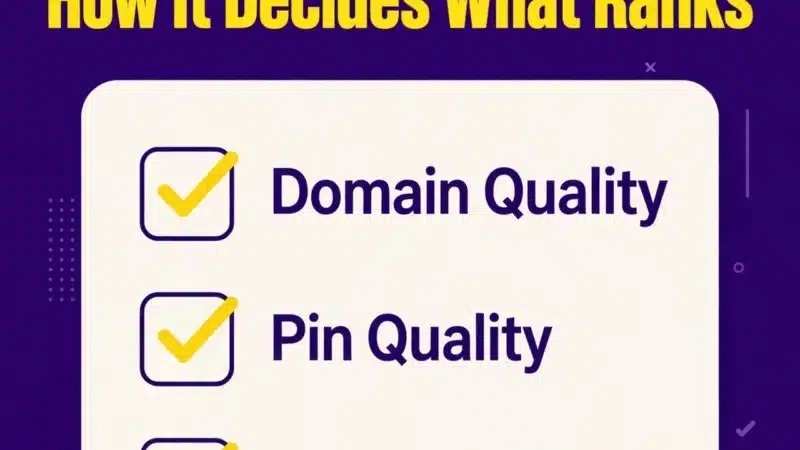
Pinterest ranks pins on four signals. Every one of them is something a blogger can control.
- Domain quality — how trusted your blog is. Pins that link to a fast, relevant site people save and click raise the score of every pin you publish after them. A slow blog with thin posts drags every pin down.
- Pin quality — the image itself plus a complete title, description, and working link. A pin with a keyword title and a real description outranks a pretty image with no words.
- Pinner quality — how active and consistent your account is. An account posting 1–2 fresh pins a day signals reliability far more than one dumping 30 pins once a month and going silent.
- Relevance + engagement — how well your pin’s text matches the search, and how people react. Saves are the strongest signal, and “long clicks” (someone spending 35+ seconds on your page after clicking) tell Pinterest the destination was worth it. That last one is on your blog post, not your pin: the post has to deliver what the pin promised.
No single fix flips your traffic overnight. The four signals work together, and they reward the blogger who treats Pinterest like SEO, not like social media.
Set Up Your Blog for Pinterest (Do This First)
Before you pin anything, get the foundation right. All of this is free.
- Switch to a business account. It costs nothing and unlocks Pinterest Trends, Analytics, and Rich Pins. If you already have a personal account, convert it in settings — you keep your boards and pins.
- Claim your website. Connect your domain in Pinterest settings. Claiming proves you own the blog, and it feeds the domain-quality signal that lifts all your pins.
- Turn on Rich Pins. Article Rich Pins pull your post title and meta description directly into the pin, which improves click-through and keeps the information consistent when other people save your content. Most blogs get Rich Pins working by validating one post URL in Pinterest’s Rich Pin validator after claiming the site.
- Name your profile for search. Add your main topic after your blog name in the display name, and write a two-sentence bio with three to five keywords and a link to your blog.
- Add a Save button to your blog. Pinterest offers a Save button for websites, so readers can pin your post images with one click. Every reader save is a free pin from a real account, and it tells Pinterest your post is worth showing.
Pinterest Keyword Research for Bloggers
Bloggers already know keyword research from Google. Pinterest works the same way, with shorter, plainer queries. People type “easy sourdough recipe”, not “best artisanal sourdough bread baking techniques for beginners”.
- Pinterest Trends (free, in the business dashboard): shows how a term has trended over the past year, plus related terms and seasonal timing. Check your seed keyword there first, before you write the post.
- Search-bar autocomplete: type your seed keyword and write down every suggested completion. Those are real queries, and the colored topic bubbles under the results are more keywords.
- Google cross-check: readers often type the same long-tail queries into Google first, so a Google search volume above 1,000/month is a reliable sign the keyword has weight on Pinterest too.
Build your list as one primary keyword per blog post, with 3–5 long-tail variations around it. Long-tail wins on Pinterest: a short keyword like “budget travel” has everyone competing for it, while a longer phrase like “budget travel tips for families” has fewer searches but far less competition — and a much higher chance to rank. For this guide the primary is “Pinterest for bloggers”; the secondaries are “how to get traffic from Pinterest”, “Pinterest SEO for bloggers”, “Pinterest rich pins for bloggers”, “Pinterest vs Instagram for bloggers”, and “Pinterest scheduler Tailwind”.
Write the keyword into the post itself, not just the pin. Pinterest reads your page, and a post that matches the pin’s promise earns the long click that lifts the pin higher.
Pin Design That Gets Clicks
Your pin is the search result. Nobody clicks a result they cannot read.
- Size: 1000×1500 pixels, 2:3 vertical. Square and horizontal pins take less space in the grid and show up less in search. Oversized pins beyond 2:3 have been progressively capped since 2023.
- Text overlay that reads at grid size. Keep it to 4–7 words, big and high-contrast. If the title is unreadable at 236 pixels wide, it won’t get clicked. Put your primary keyword in the on-image headline: Pinterest’s OCR reads the text on your image and treats it as a ranking signal.
- One idea per pin. A pin that tries to say everything says nothing in the feed. One post, one promise, one click.
- Make 3–5 fresh designs per article. The 2026 algorithm prioritizes new, original images over re-saves of the same image, even when the destination URL is the same. Make 3–5 fresh pin designs for each blog post and spread them over 2–3 months. Different headline, different layout, same post. Each one is a new chance to rank.
- Real images over low-effort AI stock. Pinterest now detects AI-generated images and gives users the option to limit GenAI content in their feeds. Your own photos and genuinely designed graphics rank better.
Short vertical video (6–15 seconds) also earns higher engagement than static pins. Use it for tutorials, before-and-after content, and quick tips that end with a reason to click through to the full post.
Boards: One Board Per Blog Topic
Treat your account like a library, not a junk drawer. One board per core topic your blog covers, named exactly how people search, with a keyword-rich description. A food blog might have “Easy Weeknight Dinners”, “Sourdough Recipes”, and “Meal Prep Ideas” — not “Yum” and “Stuff I Like”. Topical concentration is itself a ranking signal: a board full of Pinterest SEO pins tells Pinterest your account is an authority on that topic.
Start with 5–8 boards around your main topics, and pin every new pin to its most relevant board first. Saving your own pin to a second board later is fine; the first board is the one that counts most. When you publish a new post, pin its fresh designs to that post’s board first, then to one closely related board a few days later.
How Often to Pin (And How Tailwind Helps)
1–2 fresh pins a day, 5–15 a week. Consistency beats volume: 2 pins a day, every day, outperforms 30 pins in one sitting. Fresh pins get a temporary visibility boost, so a steady cadence keeps new pins in circulation while older ones compound.
Nobody has time to pin by hand every day. That is what a scheduler is for.
Tailwind is the main Pinterest scheduler, and it has been an official Pinterest partner since 2012, which means it publishes through Pinterest’s own API. Its SmartSchedule feature picks posting times based on when your audience is most active, and its SmartPin feature generates fresh pin designs from your post URLs each week. There is a free plan (5 scheduled posts a month), and paid plans start at $17.99 a month on annual billing. For a blogger publishing two or three posts a week, the paid plan usually pays for itself in saved time within a couple of months.
If you are not ready to pay, Pinterest’s own free scheduler holds up to 10 scheduled pins, up to 30 days ahead. It is enough to start. The workflow is the same either way: batch one hour a week, make the pins for that week’s posts, queue them, and get back to writing.
Expect 60–90 days before you see a real shift. Pinterest traffic is evergreen and slow to start — the pins you publish in month one are the ones paying off in month three. A blog that publishes consistently for a quarter builds a base of ranking pins that keeps growing with every new post.
Turn Readers Into Subscribers
Traffic is only half the job. A Pinterest visitor who reads one post and leaves is a nice number in Analytics. A visitor who joins your email list is an asset you own.
Pinterest visitors arrive with more intent than social scrollers — they came looking for an answer. Give them a clear next step on the post itself: a related guide linked in the first few paragraphs, a free checklist or template in exchange for an email, and a short “read next” list at the end. Internal links matter twice here: they keep the reader on your blog longer (which feeds the long-click signal), and they turn one Pinterest click into two or three page views.
Check which posts Pinterest sends the most traffic to, then make those posts your best conversion pages. A post that ranks on Pinterest and captures emails is the closest thing a blog has to a machine.
Measure What Matters
In Pinterest Analytics, watch saves and outbound clicks per pin — not impressions. Impressions tell you Pinterest showed the pin; saves and clicks tell you it earned its ranking. Check the first 48 hours: save rate in that window is the single highest-weighted early signal. Double down on whatever format and topic earns saves, and remake your best pins as fresh designs every few months. Tag every pin link with UTM parameters (?utm_source=pinterest&utm_medium=social&utm_campaign=pin-name) so Google Analytics 4 shows exactly which pins send sessions — Pinterest’s own numbers undercount clicks.
Once a month, open your top 10 posts by Pinterest traffic and ask one question: what do they have in common? Same topic, same pin style, same headline format? That pattern is your next month’s content plan.
Mistakes That Kill Blog Traffic
- Keyword-stuffed descriptions that read like tag dumps.
- Square or horizontal pins.
- Repinning the same image over and over instead of fresh designs.
- Linking to slow or irrelevant pages (Pinterest tracks long clicks — a bounce hurts).
- Treating Pinterest like Instagram: pretty pictures with no keywords rank nowhere.
- Expecting traffic in a week and quitting before the 60–90 day window.
- Pinning only your own posts and never engaging: save other bloggers’ useful pins to your boards too. It keeps your account active and your boards genuinely useful, which is what Pinterest rewards.
FAQ
How long before Pinterest sends real traffic to my blog?
60–90 days for a real shift on a new account. Pins keep ranking for months or years after that, so the work compounds.
Do I need Tailwind to succeed on Pinterest?
No. Pinterest’s own free scheduler (10 pins, 30 days ahead) is enough to start. Tailwind saves time once you are pinning daily — SmartSchedule and automatic fresh designs are the features bloggers pay for.
Can a brand-new blog rank on Pinterest?
Yes. Around 96% of searches are unbranded, so relevance and saves beat follower counts. A new blog with the right keywords can outrank an established site on a specific query.
Pinterest or Instagram first?
If your goal is readers on your blog, Pinterest first. Instagram is better for community and personality; Pinterest is better for traffic.
How many pins should I make per blog post?
3–5 fresh designs, spread over 2–3 months. Different headline, different layout, same post.
Do hashtags help on Pinterest?
No. Pinterest has said hashtags no longer boost reach or ranking.
Do I need a business account?
Yes — it unlocks Pinterest Trends, Analytics, and Rich Pins, all free.
Bottom Line
Pinterest turns a blog into a traffic machine by treating it like a search engine: research the keyword before you write, put it in all seven places, turn on Rich Pins, make 3–5 fresh pins per post, and pin 1–2 a day with a scheduler. Do that for a quarter and the pins start compounding — every new post adds to a base of ranking pins that keeps sending readers while you write the next one. That is the whole game.
Sources: Pinterest Q3 2026 results (661M MAU, +10% YoY, all-time high); Pinterest Business data via Sprout Social (96% unbranded searches); Tailwind pricing and features (official Pinterest partner since 2012, free plan 5 posts/month, Pro from $17.99/month annual billing); Pinterest distribution and pin-performance guidance; Pinterest Trends and Pinterest Predicts 2026.

The Teck Hustlers Editorial Team covers technology, business, finance and gaming news for readers who want the story behind the headline. Every article is researched, written and edited by our in-house team, checked against company announcements, filings and reputable reporting, and updated when new facts emerge. We focus on what each development means for founders, professionals, investors and everyday users. Have a tip or a correction? Reach us through our contact page.